We analyzed 248,275 non-ad LinkedIn posts from 2024, 2025, and 2026 to find out if post length affects engagement. The data pushed back on a lot of common advice. Short posts and long posts win.
The middle is a dead zone.
LinkedIn drives 80% of B2B leads from social media, and only 3% of users post weekly. Consistent posters with correctly formatted content have a structural advantage. This guide covers character limits, image dimensions, video specs, document post performance, and link previews.
TL;DR
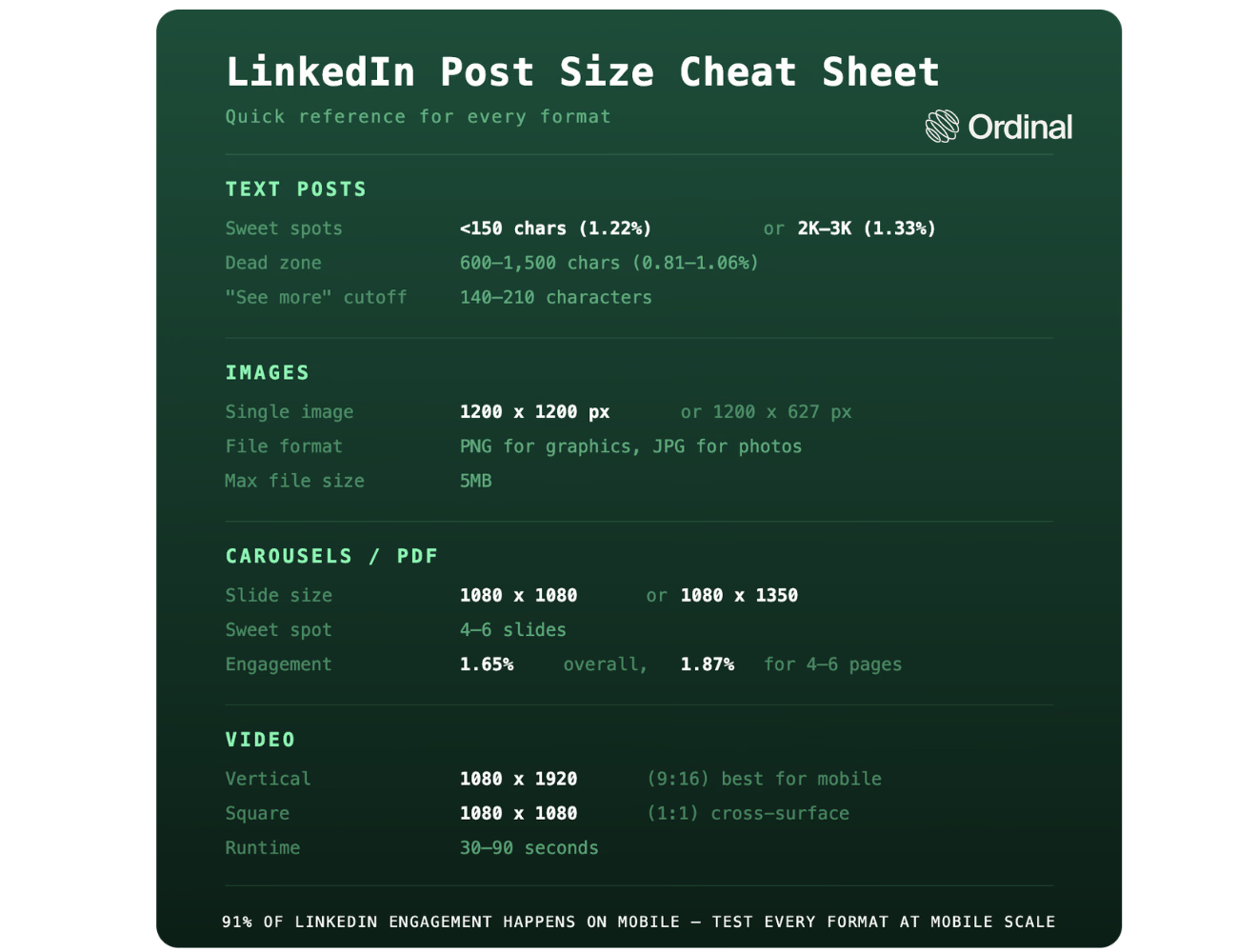
- Posts in the 2,000–3,000 character range earn the highest engagement rate at 1.33%
- Posts under 150 characters come in second at 1.22%
- The 600–1,500 character range is the weakest, with engagement rates between 0.81% and 1.06%
- For images, use 1200 x 1200 px square
- For carousels, 4–10 slides at 1:1 or 4:5 ratio
- For video, go vertical
Character Limits and What Length Performs
LinkedIn allows up to 3,000 characters per post. The "see more" truncation kicks in somewhere between 140 and 210 characters, depending on layout and line breaks. Your first two lines are doing most of the work.
For a deeper look at how LinkedIn counts characters (including emojis, Unicode bold, and tags), see our LinkedIn character limit guide.
Bold text formatting can help short posts punch harder visually, but length strategy matters more than formatting tricks.
Why the U-curve? Short posts land as quick, quotable observations. People react without friction.
And long posts signal genuine depth and earn dwell time, which the algorithm rewards.
The middle is awkward: too long to skim, too short to feel substantive.
Write under 150 characters or commit to 2,000+. Everything between 600 and 1,500 is the weakest place to land.
Image Post Dimensions
For single-image posts, use 1200 x 1200 pixels (square) or 1200 x 627 pixels (landscape). Square renders cleanly on both desktop and mobile. Landscape crops on some mobile views, so if your image has text near the edges, square is safer.
PNG for graphics with text overlays, JPG for photography. Keep file size under 5MB. LinkedIn compresses anything larger, and compression artifacts show up fast on graphics with hard edges.
Multi-image posts compose differently depending on count. Two images render side by side. Three give you one large image left, two stacked right. Four or more collapse into a grid with a "+X more" overlay on the last visible tile. Plan your visual hierarchy around that. Don't bury your best image in position four.
The mobile-safe zone for text on graphics is roughly the center 80% of the frame. Left and right edges get clipped in feed thumbnails on smaller screens. Most LinkedIn engagement happens on mobile, so test your image at mobile scale before scheduling.
Format: 1200 x 1200 px square, PNG for text graphics, under 5MB, critical content away from frame edges.
Document and Carousel (PDF) Post Sizes
LinkedIn accepts PDF files up to 100MB with a maximum of 300 pages. For slide dimensions that render well, use 1:1 (square, 1080 x 1080 px) or 4:5 (vertical, 1080 x 1350 px). Vertical fills more of the mobile feed. Square works across all surfaces without cropping risk.
See the full LinkedIn carousel guide for design specs by use case.
There's an overall engagement rate of 1.65%, already above what text posts in the 300–1,500 character range achieve. The subset of posts with page-count metadata (353 posts, all in the 4–6 page range) hit 1.87%. Average page count in that subset was 4.0.
It's worth noting that page-count metadata was only available for 6.11% of filtered document posts, so treat the page-count breakdown as directional rather than definitive.
Here's why carousels outperform their reach: each page swipe registers as an engagement signal. A 6-slide carousel that someone reads through generates six interaction events from a single impression. The algorithm reads that as high-interest content and extends distribution.
Treat the cover slide as your hook. If it doesn't earn the swipe, page count doesn't matter. Four to ten slides is the practical range. Enough to deliver substance, short enough that people finish.
Format: 4–6 slides at 1:1 or 4:5 ratio, lead with a strong cover, expect engagement above the text-post median.
Video Post Sizes and Specs
LinkedIn supports three aspect ratios: 1:1 (square, 1080 x 1080 px), 9:16 (vertical, 1080 x 1920 px), and 16:9 (landscape, 1920 x 1080 px). File size limit is 5GB. Maximum length is 15 minutes. Most high-performing B2B videos run 30–90 seconds.
Go vertical if you're optimizing for mobile. The 9:16 format fills the screen on phones, which reduces scroll-past behavior and increases view duration. Landscape still works for desktop-heavy audiences, but if you don't know your audience's device split, vertical is the safer default.
According to 2026 LinkedIn data from Digital Applied, video uploads on LinkedIn grew 36% year over year, and 79% of B2B marketers plan to increase video output. The format is getting more competitive.
Format: 1080 x 1920 px vertical for mobile-first reach, 1080 x 1080 px square for cross-surface flexibility, under 90 seconds.
Link Preview Sizes
When you paste a URL into a LinkedIn post, LinkedIn auto-pulls a preview image at 1200 x 627 px. You can't resize this in the editor. What LinkedIn pulls from the page's Open Graph tags is what renders. If the auto-pull is broken or grabbing the wrong image, update the og:image tag on your destination page. LinkedIn has retired its public Post Inspector tool, so updated metadata is now picked up automatically on LinkedIn's own re-crawl rather than on demand. Cached previews can persist for a while, so if you need a fresh fetch straight away, change the destination URL.
One trade-off worth knowing: posts with external links take a real reach hit. Our link reach penalty research shows that link posts get roughly 50–60% less reach on average than posts without links (DataSlayer, LinkedIn algorithm, February 2026). That penalty has grown since 2023. If distributing the link is the goal, consider posting the URL in the first comment instead.
Format: Link previews auto-render at 1200 x 627 px. Fix broken previews via Open Graph tags. Factor in the reach penalty before deciding whether the link belongs in the post or the first comment. Link-preview and reach guidance in this section was last verified in August 2026.
Why Post Size Matters More in 2026
Organic reach on LinkedIn has been contracting. According to Agorapulse's LinkedIn algorithm research, post views dropped roughly 50% and engagement dropped 25% in 2025. Follower growth fell 59%. When the platform gives you less distribution by default, every post element has to earn its place.
Post size intersects with all of this. Length affects dwell time, which the algorithm reads as a quality signal.
Format affects whether your content even renders correctly on the device where 91% of engagement happens. A post that crops awkwardly on mobile or lands in the 600–1,500 character dead zone is leaving performance on the table before anyone reads a word.
Size is one variable in a broader system. Our posting frequency data shows consistency compounds over time, and so does the quality of your first-hour engagement. Getting the dimensions right is the baseline.
The posts that break through combine the right format with a strong hook, a clear point of view, and early engagement momentum. Clay's LinkedIn growth from 8K to 120K followers in a year came from treating every post element as part of a system.
Final Thoughts
Three findings from the data.
The character count sweet spots are real: under 150 characters or 2,000–3,000 characters. The middle underperforms.
Carousels punch above their weight. 1.65% engagement rate overall versus 0.81–1.06% for mid-length text posts, and the page-swipe mechanic is why.
Vertical format wins on mobile, and mobile is where LinkedIn engagement actually happens.
Post size is one variable in a system. Get the dimensions right so your content renders cleanly, then put your energy into the hook, the format choice, and your posting consistency.
Managing all of this across a team or multiple accounts is where a LinkedIn scheduling tool like Ordinal earns its keep. Realistic previews show exactly where "see more" cuts off, what your image grid looks like, and how your post renders on mobile before it goes live.
Frequently Asked Questions
What Is the Maximum Character Limit for a LinkedIn Post?
3,000 characters. The "see more" truncation kicks in around 140–210 characters depending on layout, so front-load your hook before that cutoff.
What Is the Ideal LinkedIn Post Length for Engagement?
Based on 248,275 posts, the highest engagement comes from 2,000–3,000 characters (1.33%) and posts under 150 characters (1.22%). The 600–1,500 character middle is the weakest. Commit to short or go long.
What Size Should LinkedIn Images Be?
1200 x 1200 pixels (square) or 1200 x 627 pixels (landscape). PNG for graphics with text, JPG for photography. Keep file size under 5MB.
What Dimensions Should a LinkedIn Video Be?
1080 x 1920 pixels (9:16 vertical) for mobile-first feeds or 1080 x 1080 (1:1 square) for cross-surface reach. Most high-performing B2B videos run 30–90 seconds.
How Many Slides Should a LinkedIn Carousel Have?
Four to ten. There's an average of 4 pages with 1.87% engagement for posts with page-count data. Treat the cover slide as your hook.
Does Post Length Affect LinkedIn Reach?
Yes. Average impressions increase with length. Posts in the 2,000–3,000 character range averaged 10,677 impressions, compared to 2,171 for posts under 150 characters. Longer posts earn more dwell time, which the algorithm uses to extend distribution.
What's the Best LinkedIn Post Size for Mobile?
Square (1:1) or vertical (4:5 or 9:16). These formats render best on mobile feeds where the majority of LinkedIn engagement happens. Landscape can feel small on phone screens.
Should I Use Bold or Italic Text in LinkedIn Posts?
LinkedIn doesn't support native bold or italic. Unicode characters can approximate them, but they can affect search indexing and accessibility. Use sparingly to highlight key points. See our bold text formatting guide for details.
Related Posts
Looking to learn more? The below posts may be helpful for you to learn more about social media and content marketing.