Instagram Threads has amassed over 400 million monthly active users since it launched in July 2023. But the platform's algorithm prioritizes recency above almost everything else, giving you a brief window to capture engagement before newer posts take over. We studied engagement velocity across different posting times to determine when posts consistently outperform. The data reveals specific windows for each day of the week - and understanding these patterns changes everything about your Threads strategy. In this guide, we'll explore these optimal posting times and how Ordinal can help you maximize your reach.
TLDR:
- Post on Threads between 7-9 AM, 12 PM-2 PM, 7-9 PM on weekdays for maximum engagement velocity
- Wednesday 12-2 PM delivers the highest engagement rates across all days and times
- Your content has 60-90 minutes to gain traction before the algorithm deprioritizes it
- Ordinal provides AI-powered scheduling and analytics to automate optimal posting times across Threads
What is Instagram Threads?
Instagram Threads is Meta's text-based social networking app, designed to compete with platforms like X (formerly Twitter). Threads allows users to share short text posts, links, photos, and videos. It's closely integrated with Instagram, making it easy for users to connect with their existing Instagram followers.
Why Posting Time Matters on Threads
Threads hosts 115.1 million daily active users, creating intense competition for visibility in crowded feeds. The platform relies on AI-powered feed ranking that weighs engagement velocity, content relevance, and user interaction history - but timing is critical for breaking through:
- Recency dominates the algorithm: Freshly published posts get a brief window to capture engagement before newer content pushes them down, giving your posts a shelf life of roughly 60 to 90 minutes.
- The first 15-30 minutes determine everything: The algorithm tracks how quickly posts accumulate likes, comments, and shares. Posts that generate rapid engagement receive algorithmic priority as the system interprets quick interactions as a quality signal and pushes that content to more users' For You feeds.
- Wrong timing kills reach: If your content goes live when your audience isn't active, it misses the critical engagement window entirely and loses algorithmic momentum, regardless of content quality.
- User interaction history amplifies timing: If someone frequently engages with your content, they're more likely to see your posts early. But reaching new audiences beyond your core followers requires hitting engagement velocity thresholds quickly—which only happens when you post during peak activity windows.
Your posting window determines whether you catch users during their active scrolling periods or miss them entirely. When you post during peak hours, more of your followers see and interact with your content immediately, signaling to Threads that your post deserves wider distribution across the platform.
Best Times to Post on Threads
Based on Ordinal's analysis of millions of Threads posts, here are the general best times to post:
- Weekdays: 7 AM - 9 AM, 12 PM - 2 PM, and 7 PM - 9 PM (local time)
- Weekends: 10 AM - 1 PM, and 8 PM - 10 PM (local time)
However, these times can vary based on your specific audience and niche. It's essential to analyze your own followers' behavior for optimal results.
Best Days to Post on Threads
Our data shows that certain days tend to perform better on Threads:
- Wednesday: Highest overall engagement
- Thursday: Strong performance, especially in the morning
- Tuesday: Good for B2B content
- Friday: Ideal for lifestyle and entertainment content
- Saturday: Best for morning posts
While Sunday and Monday generally see lower engagement, they can still be effective for certain niches or time-sensitive content.
Best Time to Post on Threads on Monday
Monday mornings on Threads see a distinct spike in user activity between 7 AM and 9 AM as people scroll during their commutes and coffee breaks. Based on our analysis of Threads engagement patterns, posting during this early window captures attention when users are mentally transitioning into their work week.
The secondary engagement window on Mondays falls between 11 AM and 1 PM, when users take lunch breaks and check social feeds. This midday period performs well for content that sparks conversation or offers quick value.
If you're targeting a professional audience, Monday mornings work particularly well. People browse social feeds to ease into the week, making them more receptive to content that educates or entertains without heavy commitment.
Avoid posting after 3 PM on Mondays. Engagement drops off as users focus on wrapping up tasks and preparing for the rest of the week ahead, similar to engagement patterns on X (Twitter).
Best Time to Post on Threads on Tuesday
Tuesday performance on Threads tends to be more consistent than Monday, with engagement spreading across multiple windows throughout the day. The strongest posting times fall between 8 AM and 10 AM, when users settle into their work routines and check social feeds before diving into meetings.
Midday Tuesday (12 PM to 2 PM) performs reliably well. Users are in the rhythm of the work week and more likely to engage with content during breaks. This window is ideal for discussion-oriented posts that invite comments and interactions.
Evening engagement on Tuesday picks up between 7 PM and 9 PM. People wind down from their day and spend more time scrolling through social feeds, making this a solid window for content that entertains or provides deeper value.
Tuesday offers flexibility for testing different posting times since engagement remains steady throughout the day rather than clustering in one specific window, unlike LinkedIn's more concentrated peak hours.
Best Time to Post on Threads on Wednesday
Wednesday consistently delivers the highest engagement rates on Threads compared to other weekdays. Users are fully immersed in their routines by midweek, and the fatigue of Monday has passed while the distraction of approaching weekend hasn't set in yet.
The prime posting window on Wednesday runs from 12 PM to 2 PM. This lunch hour period sees users actively scrolling through their feeds during breaks, creating maximum visibility for your content. Posts published during this timeframe receive more interactions and reach broader audiences.
The afternoon window between 3 PM and 5 PM also performs exceptionally well on Wednesdays. Users take mental breaks from work tasks and engage more thoughtfully with content compared to rushed morning scrolling.
If you can only post once weekly, Wednesday afternoon is your safest bet for reaching the largest audience, a strategy that also applies to Instagram posting schedules.
Best Time to Post on Threads on Thursday
Thursday mirrors Wednesday's strong engagement but with a noticeable shift toward later hours. The morning window between 9 AM and 11 AM performs reliably as users check feeds after initial work tasks are underway.
Lunchtime posting (12 PM to 1 PM) remains effective on Thursday, though slightly less than Wednesday's peak performance. Users continue scrolling during breaks but with growing anticipation of the approaching weekend.
The standout difference on Thursday is the extended evening engagement window from 6 PM to 9 PM. Users stay active longer as they mentally shift away from work mode and spend more time browsing social content.
Thursday works well for content that bridges professional and casual themes, as audiences become more relaxed while still engaged with work-related topics, though TikTok audiences follow different patterns.
Best Time to Post on Threads on Friday
Friday engagement on Threads follows a unique pattern compared to other weekdays. Morning hours between 8 AM and 10 AM perform exceptionally well as users start their day with lighter work expectations and spend more time scrolling before meetings begin.
The critical difference on Friday is the sharp engagement drop-off after 2 PM. Users mentally check out as the weekend approaches, making afternoon posting significantly less effective than earlier weekdays. Most professionals disengage from social feeds after lunch on Fridays.
To maximize Friday reach, prioritize morning posting. The 8 AM to 10 AM window captures users at peak attention before they shift focus to wrapping up tasks and planning weekend activities.
Friday content performs best when it leans casual or entertaining rather than heavy professional topics. Users seek lighter fare as they transition into weekend mode.
Best Time to Post on Threads on Saturday
Saturday posting on Threads requires a completely different approach than weekday scheduling. Users wake up later and scroll at a more relaxed pace, with peak engagement shifting to 10 AM through 1 PM.
The sweet spot for Saturday posts falls between 11 AM and 12 PM. People have finished morning routines and are leisurely browsing social feeds while having coffee or planning their day. This window captures users when they're most receptive to engaging with content.
Afternoon engagement extends until around 3 PM on Saturdays before dropping off as users leave for activities or events. Evening posting after 7 PM sees minimal interaction compared to weekdays since people are typically out socializing or disconnected from their phones.
Keep Saturday content light and entertaining. Users aren't in work mode and respond better to casual, visually engaging posts rather than professional topics, which requires thoughtful content planning.
Best Time to Post on Threads on Sunday
Sunday engagement on Threads follows a gradual build pattern as users mentally prepare for the upcoming work week. Morning activity stays quiet until around 11 AM, with users sleeping in or focusing on offline weekend activities before checking social feeds.
The afternoon window from 2 PM to 5 PM sees moderate engagement as users begin winding down their weekends. However, the real opportunity on Sunday comes during evening hours.
Between 7 PM and 9 PM, Sunday engagement peaks as users settle in for the night and catch up on content they missed over the weekend. This "Sunday Scaries" window captures audiences preparing for Monday, making them more receptive to content that helps them transition back to work mode.
Unlike Saturday's early drop-off, Sunday maintains engagement later into the evening. Users stay active scrolling feeds until around 10 PM as they mentally shift gears for the week ahead on Threads.
Analyzing Your Audience Activity Patterns
General posting times provide a starting point, but your specific audience likely behaves differently based on industry, geography, and content type. Finding your optimal windows requires tracking your own engagement data over time.
Start by reviewing your Threads posts from the past 30 days. Note which posts received the most likes, comments, and shares, then record what time and day you published them. Look for patterns where certain hours consistently outperform others.
Most social media management tools provide analytics that break down engagement by hour and day of week. Review this data monthly to spot trends. If Tuesday at 1 PM consistently drives higher engagement than Friday at 9 AM, that tells you where to focus your scheduling efforts.
Test different time slots deliberately. Post at 8 AM one week, then 12 PM the next, keeping content type and quality consistent. After four weeks of testing, compare performance to identify your audience's true activity peaks.
Adjust your strategy quarterly. Audience behavior shifts with seasons, industry cycles, and life changes. What worked in January might underperform by April, so review and refine your posting schedule regularly based on fresh data rather than old assumptions.
Content Type and Timing Strategy
Text-based posts perform best during morning commutes (7 AM to 9 AM) when users scroll quickly and prefer scannable content. Short, punchy observations or hot takes capture attention during these rushed windows.
Visual content and image-based threads see stronger engagement during lunch breaks (12 PM to 2 PM) when users have more time to stop and engage with content that requires visual processing.
Video threads work best during evening hours (7 PM to 9 PM) when users settle in with more time to watch longer content. Avoid posting video during morning rushes when users rarely watch with sound on.
Question-based posts that spark discussion should go live during midday hours (11 AM to 2 PM) when users actively participate in conversations during breaks. Evening posts get views but fewer comment interactions as people passively scroll before bed.
Time Zones and Global Audience Considerations
Threads operates in 100 countries with support for over 30 languages, creating scheduling complexity for brands serving global audiences. Posting at 12 PM EST might capture New York users perfectly while missing audiences in London or Singapore entirely.
Start by identifying where your audience concentrates geographically. Review your follower demographics to determine whether you serve primarily one region or multiple time zones equally. If 70% of your audience lives in North America, optimize for those peak hours rather than trying to serve everyone simultaneously.
For truly global audiences, staggered posting works better than single daily posts. Publish separate posts targeting each major geographic region during their respective peak hours. A post at 9 AM EST for American audiences, then another at 9 AM GMT for European users, then 9 AM AEST for Australia.
Scheduling tools become critical when managing multiple time zones. Manually posting at 3 AM to reach Asian audiences isn't practical long-term. We built Ordinal to handle multi-timezone scheduling easily, letting you queue posts for optimal delivery times across regions without staying up all night.
If staggered posting feels like too much work, choose your primary market and optimize for that time zone. Better to maximize engagement from your core audience than dilute results trying to serve everyone equally.
Posting Frequency and Timing Optimization
Posting frequency directly impacts your timing strategy's effectiveness. Threads users scroll frequently throughout the day, but oversaturating your audience dilutes individual post performance.
Post one to three times daily during your identified peak windows. More than three posts risks audience fatigue and splits engagement across multiple pieces of content instead of concentrating interactions on fewer, stronger posts, which is why a marketing calendar tool helps manage frequency.
Space posts at least four hours apart. This gap lets each post complete its 60 to 90 minute algorithmic visibility window before introducing new content. Posting too close together cannibalizes your own reach as newer posts push down earlier ones.
Quality beats volume. One well-timed post at 12 PM will outperform three mediocre posts scattered throughout off-peak hours.
Scheduling Threads Posts With Ordinal
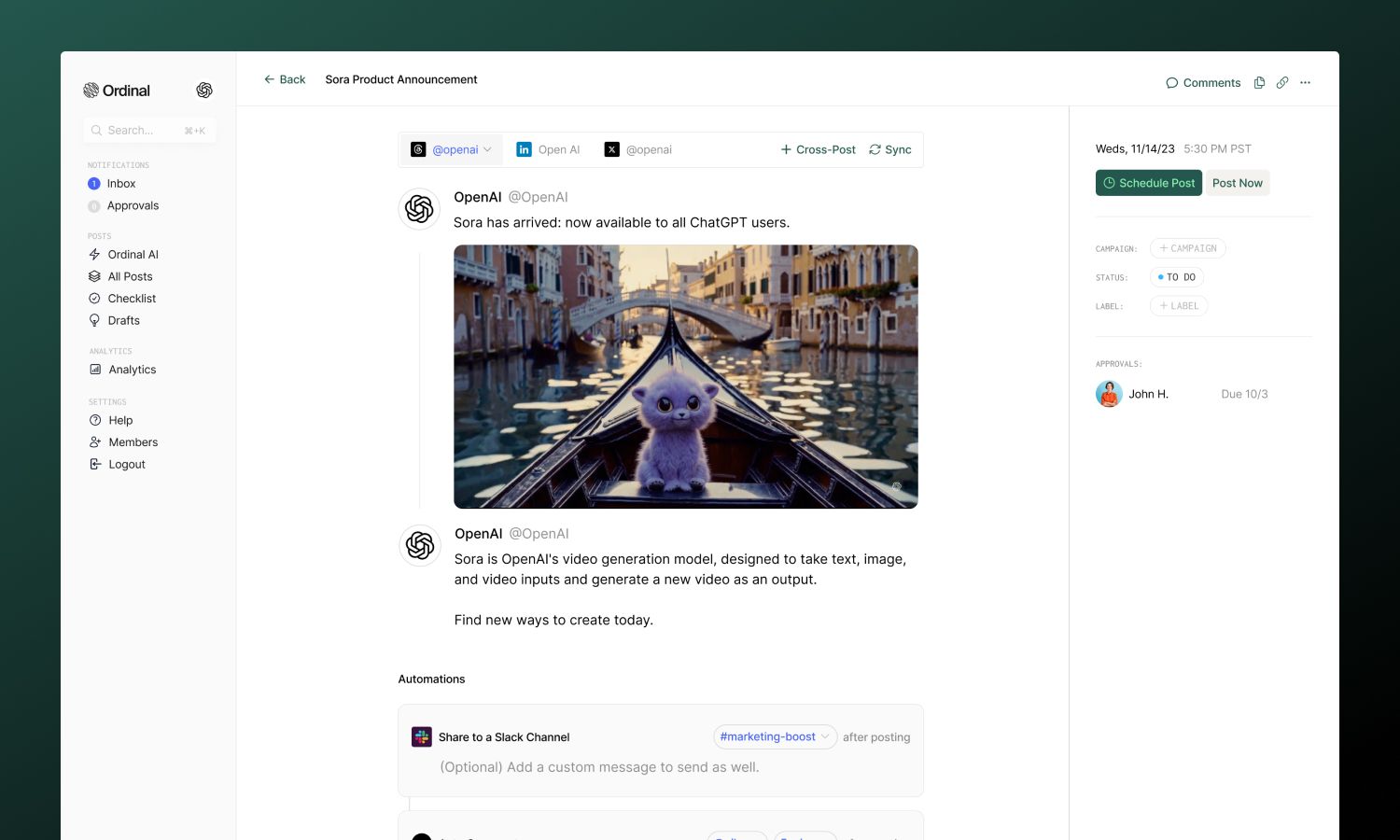
Ordinal transforms the timing strategies in this guide into consistent execution without requiring you to manually post at specific hours:
- AI-powered scheduling: Our best time to post feature analyzes engagement patterns across your Threads account and automatically recommends optimal publishing windows for maximum reach.
- Strategic content calendar: Plan and visualize your Threads content alongside other social platforms, scheduling multiple posts strategically across the week to ensure each goes live during peak audience activity.
- Preview before publishing: See exactly how your Threads post will appear before it goes live, letting you refine formatting and content for maximum impact.
- Performance analytics: Our dashboard breaks down engagement by posting time, helping you identify which windows drive the strongest results and track follower growth and top-performing content types.
- Cross-platform publishing: Queue your Threads content in Ordinal and let the scheduler handle timing automatically across all your social channels for a cohesive strategy.
- Competitor benchmarking: Compare your Threads performance against competitors and industry leaders to stay ahead of the curve.
Instead of setting alarms or remembering optimal windows, Ordinal turns strategic timing into automated execution.
How to Find Your Best Posting Times
To determine the best times for your specific audience:
- Use Ordinal's Analytics: Our platform provides detailed insights into your Threads performance, including optimal posting times based on your audience's activity.
- Experiment and Track: Try posting at different times and days, then analyze the results using Ordinal's performance tracking tools.
- Consider Your Audience: Think about your followers' daily routines and when they're most likely to be active on Threads.
- Monitor Competitors: Use Ordinal to track when your competitors post and how their content performs.
Final Thoughts on Maximizing Threads Engagement
Posting at the best time on Threads means your content catches people when they're ready to engage, not when they're rushing through their day. While the data shows clear patterns, your specific audience holds the real answers.
Track your posts over the next month, identify which time slots drive the strongest interactions, and focus your energy there. Aim to post 1-3 times per day, but always prioritize quality over quantity.
By leveraging Ordinal's analytics and scheduling tools, you can optimize your posting times and build a stronger presence without the manual effort. With the right strategy, you can make Threads a powerful part of your social media marketing mix.
Ready to optimize your Threads strategy? Sign up for Ordinal and start posting at the perfect times for your audience!
FAQ
What time should I post on Threads for maximum engagement?
Post between 7-9 AM, 12-2 PM, or 7-9 PM on weekdays to catch users during commutes, lunch breaks, and evening scrolling sessions, with Wednesday 12-2 PM delivering the highest engagement rates across all time slots."
How long does my Threads post have to gain traction?
Your content has 60-90 minutes to accumulate engagement before the algorithm deprioritizes it, with the first 15-30 minutes being the most critical window for generating likes, comments, and shares.
Should I post the same content at different times for global audiences?
Yes, if you serve multiple regions equally, publish separate posts targeting each major time zone during their respective peak hours (9 AM EST, 9 AM GMT, 9 AM AEST) rather than trying to reach everyone with a single post.
How often should I post on Threads each day?
Post 1-3 times daily during your peak engagement windows, spacing posts at least four hours apart to avoid cannibalizing your own reach and splitting engagement across multiple pieces of content.
Can Ordinal automatically schedule my Threads posts at optimal times?
Yes, Ordinal's AI-powered scheduling analyzes your engagement patterns and recommends optimal publishing windows, then automatically posts your content during peak audience activity without manual intervention.
Related Posts
Looking to learn more? The below posts may be helpful for you to learn more about social media and content marketing.