Let's face it - managing social media is nothing like it was even a few years ago. As we head into 2026, the social media landscape has never been more complex - or more critical to business success. With constantly changing algorithms, emerging platforms, and sky-high audience expectations, the days of posting randomly and hoping for engagement are long gone.
Whether you're a solo entrepreneur, a growing startup, or an established brand, having the right social media management tool isn't just convenient - it's essential for survival in today's digital landscape.
But with so many options available, how do you choose the platform that will actually move the needle for your business? That's exactly what we'll explore in this comprehensive guide.
TLDR:
- Social media management tools now need auto-engagement, cross-posting, and team workflows
- Modern platforms should support LinkedIn, Twitter, Instagram, Facebook, TikTok, and YouTube
- Look for tools with approval workflows and Slack integration for team coordination
- Ordinal combines content creation, scheduling, and auto-engagement in one platform, for B2B teams
Key Features to Look for in Social Media Management Tools
Before diving into specific platforms, let's identify what truly matters in a social media management tool:
Content Creation and Planning
- Intuitive drafting interfaces that make content creation painless
- Robust Support for drafting features and formats (reels, etc.) supported natively by the platforms
- Planning tools to help schedule content and maintain brand consistency
- Collaboration features for team input and approvals
Scheduling and Publishing
- Multi-platform support across all major social networks
- Cross-posting capabilities to efficiently repurpose content
- Best time to post recommendations based on platform analytics
Engagement and Growth
- Auto-engagement features like scheduled comments and likes
- Team notification systems to drive internal engagement
- Analytics and reporting to track what's working
Top Social Media Management Platforms Compared
Let's examine how the leading platforms stack up against each other:
Why Ordinal Stands Out in the Crowded Market
While each platform has its strengths, Ordinal has emerged as a particularly compelling option for teams serious about social media. Here's why:
A True End-to-End Solution
Unlike many tools that excel in one area but fall short in others, Ordinal provides a comprehensive solution that handles everything from initial content drafting to post-publishing engagement.
The platform's Notion-like editor makes content creation intuitive, while its powerful scheduling features make sure your content reaches the right platforms at optimal times. What truly sets Ordinal apart, however, is its suite of auto-engagement tools that help drive initial momentum for your posts - users can automatically leave likes, comments, and reposts on posts for channels like LinkedIn, Twitter, Instagram, and Facebook.
Built for Modern Teams
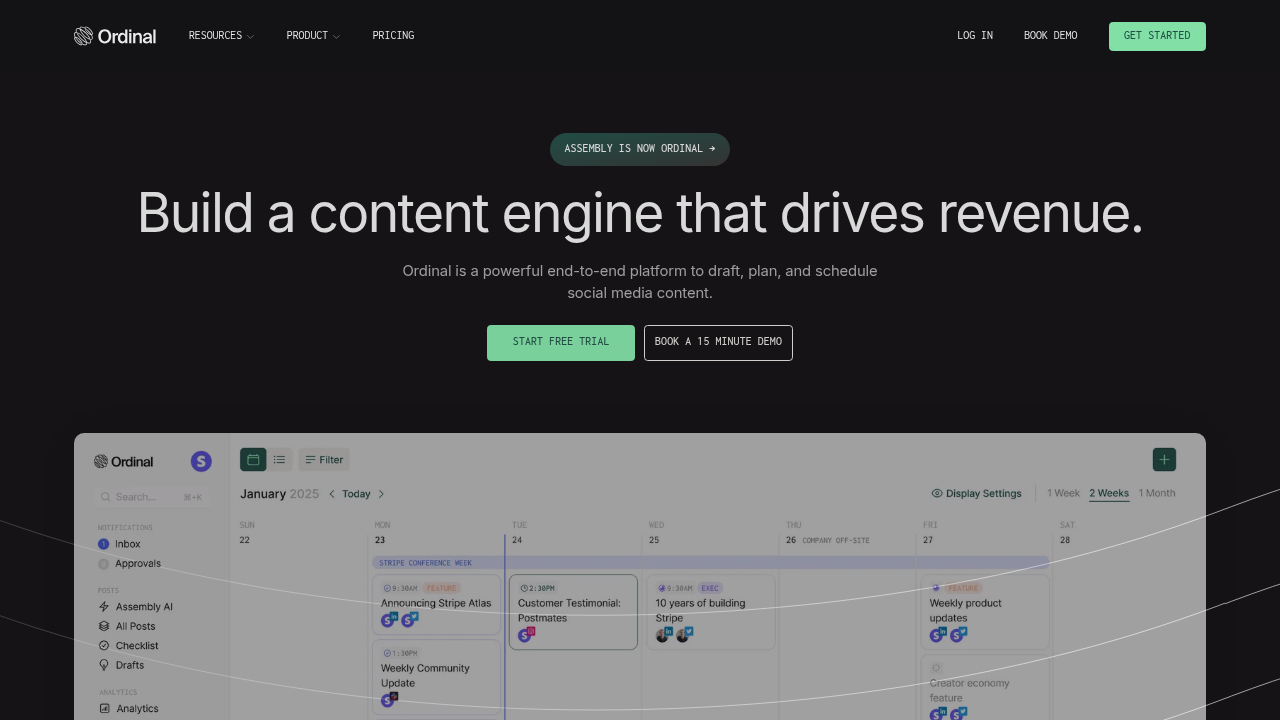
One of Ordinal's greatest strengths is its team-oriented approach. The platform includes:
- Streamlined approval workflows that integrate with Slack
- Clear campaign management for visibility across marketing initiatives
- Realistic post previews so everyone knows exactly how content will appear
- In-line commenting for collaborative refinement
Cross-Platform Versatility
Ordinal supports all major social platforms, including:
- TikTok
- YouTube
- Threads
- Slack
- Discord
- Webflow (Schedule to any CMS)
This coverage allows teams to manage their entire social presence from a single dashboard, with cross-posting capabilities that make content distribution effortless.
How Ordinal Compares to Popular Alternatives
Ordinal vs. Buffer
Buffer pioneered social media scheduling with its straightforward, queue-based approach. While Buffer excels in simplicity, Ordinal offers more comprehensive features:
Ordinal vs. Hootsuite
While Hootsuite has long been the enterprise standard for social media management, Ordinal offers a more modern approach:
Ordinal vs. Later
Later specializes in visual-first planning, particularly for Instagram. Here's how Ordinal compares:
Maximizing ROI with Social Media Management Tools
Having the right tool is just the beginning. Here's how to make sure you're getting maximum value:
1. Establish Clear Workflows
Define your content creation, approval, and publishing processes using a marketing calendar tool.
The best tools in the world won't help if your team doesn't know how to use them effectively.
2. Leverage Analytics for Iteration
Don't just post and forget. Use your platform's analytics to understand what's working and continuously refine your approach. This data-driven iteration is a key part of content marketing as a growth engine for B2B startups.
3. Utilize Auto-Engagement Features
As Sanjay Jenkins, head of growth at Replo, notes: "The auto-engagement tools are really clutch to drum up initial boosts. Frankly, we just never did it before because you had to do things manually before Ordinal."
4. Focus on Cross-Platform Adaptation
Different platforms have different requirements and audience expectations. Use your management tool to adapt content appropriately rather than reposting identical content on social media everywhere.
5. Build Internal Engagement
Many teams overlook the power of internal engagement. Features like Ordinal's Slack Boost Channels can help get your whole team involved in amplifying content.
Real-World Success Stories
The true test of any social media management tool is the results it delivers. Here are some real-world examples from Ordinal users:
Marty Kausas, founder of Pylon, shares: "This is such a no-brainer. Ordinal helps us with a lot of the non-content writing tasks like scheduling, editing existing posts, auto-liking, auto-commenting, previewing, and cross-posting to different platforms."
Claire Musech, COO at Verbatim (content marketing agency), adds: "Truly so impressed by the Ordinal team. The product is incredible, and one of the most valuable parts of our partnership is their ability to move quickly on any feedback that we give and help us build. With Ordinal, I feel confident that we are building a trusted, scalable operating system for our clients.”
For more success stories from Ordinal customers, check out a few of these case studies.
Choosing the Right Plan for Your Needs
Most social media management platforms, including Ordinal, offer tiered pricing based on your needs:
For Solopreneurs and Small Teams
Look for plans that offer key scheduling features without overwhelming you with unnecessary capabilities you won't use.
For Growing Businesses
Mid-tier plans typically offer the best balance of features and value, with team collaboration tools and more reliable analytics.
For Agencies and Large Enterprises
Premium plans with client management features, advanced reporting, and white-labeling capabilities are worth the investment.
Ordinal's pricing comes with unlimited users with every workspace and includes custom features for enterprises and agencies.
Getting Started with Social Media Management Tools
Ready to level up your social media management? Here's a simple process to get started:
- Identify your primary needs - Are you most focused on content creation, scheduling, analytics, or team collaboration?
- Take advantage of free trials - Most platforms, including Ordinal, offer free trial periods to test their features.
- Start with a core platform - Begin with your most important social channel and expand from there.
- Establish your workflow - Document your process for content creation, approval, and publishing.
- Train your team - Ensure everyone understands how to use the platform effectively.
Conclusion: The Future of Social Media Management
As social media continues to evolve, the tools we use to manage it must evolve as well. The most successful platforms will be those that combine intuitive interfaces with powerful automation and analytics.
Ordinal represents this new generation of social media management tools - comprehensive enough for complex marketing strategies yet intuitive enough for daily use.
Whether you choose Ordinal or another platform, investing in the right social media management tool is no longer optional - it's essential for any brand serious about building a meaningful social presence in 2025 and beyond.
The right tool won't just save you time; it will fundamentally transform how you approach social media, allowing you to focus less on logistics and more on creating the compelling content that drives real business results.
FAQ
What's the main difference between Ordinal and legacy tools like Hootsuite or Buffer?
Ordinal is built specifically for modern, text-forward platforms like LinkedIn and Twitter with team collaboration at its core, while legacy tools were designed for single-user, image-centric posting. Ordinal also includes auto-engagement features (auto-comments, likes, and reposts) that most competitors don't offer, helping your content gain early momentum.
How do auto-engagement features help my social media performance?
Auto-engagement features like scheduled comments, automatic likes from team accounts, and coordinated reposts give your content an initial boost right when it goes live. This early activity signals to platform algorithms that your content is valuable, increasing its reach and visibility to a wider audience.
Can I manage multiple client accounts or team members in one workspace?
Yes, Ordinal is designed for scalable multi-account management, allowing agencies and large teams to connect dozens of profiles (personal LinkedIn accounts, company pages, Twitter accounts, etc.) from a unified dashboard. Every workspace includes unlimited users, and you can organize content by client or campaign with built-in approval workflows.
When should I consider switching from my current social media tool?
If your team is spending excessive time copying content between platforms, struggling with approval workflows, or unable to coordinate team engagement on posts, it's time to switch. Ordinal is particularly valuable for B2B teams focused on LinkedIn who need to tie social activity to business outcomes and pipeline generation.
How does cross-posting work across different social platforms?
With one-click cross-posting, Ordinal automatically carries over your content and assets to each selected network and makes minor format adjustments as needed. You can repurpose a post across LinkedIn, Twitter, Instagram, Facebook, and more without manual copy-pasting, while still maintaining platform-specific formatting.
Related Posts
Looking to learn more? The below posts may be helpful for you to learn more about social media and content marketing.