Everyone sees those lead magnet posts on LinkedIn where hundreds of people comment for a template, but when you try the same approach, you get crickets. The issue isn't that your audience doesn't want free resources. It's that your post either lacks specificity about what they're getting, asks them to jump through too many hoops, or solves a problem they don't have right now. Here's the exact structure that turns casual scrollers into qualified leads who actually want to hear from you.
TLDR:
- Lead magnet posts convert 3x better than standard LinkedIn content by offering templates or guides
- Comment-to-DM delivery keeps interactions native and avoids the 60% reach penalty from external links
- Carousel posts can achieve up to 4x higher engagement than standard text posts.
- Ordinal streamlines lead magnet content creation with scheduling, team collaboration, and automated engagement
What Is a Lead Magnet Post on LinkedIn
Lead magnet posts on LinkedIn offer something valuable in exchange for engagement or contact information. Unlike regular posts that aim for likes and comments, these are designed to capture leads while keeping users on LinkedIn.
Traditional LinkedIn content educates or entertains with no ask. Lead magnet posts promise specific deliverables like templates, guides, checklists, or reports that solve an immediate problem.
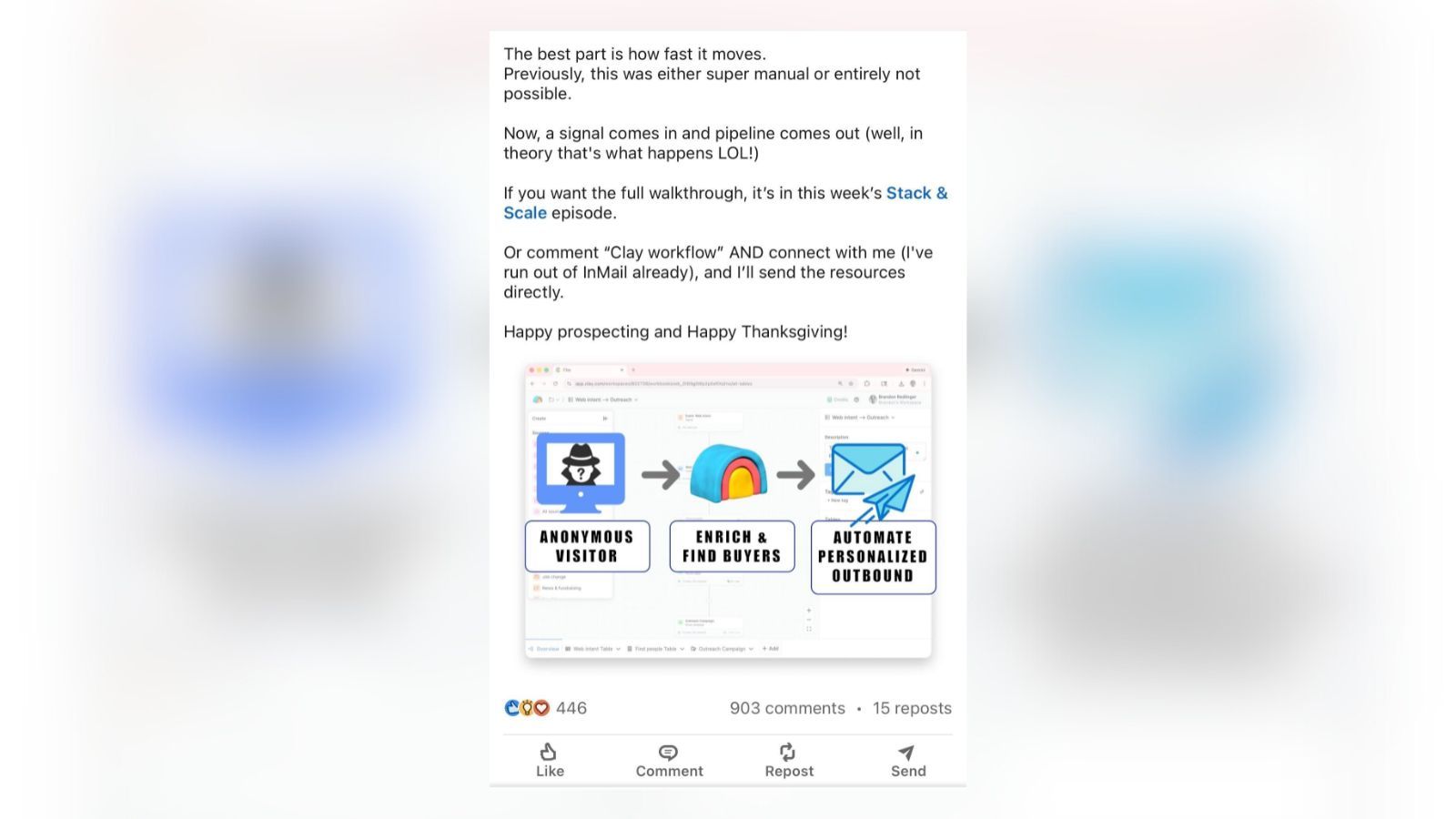
Here's how they work: you create a post announcing your free resource, explain its value, and direct interested users to comment with a specific word, send a direct message, or engage with the post. You deliver the resource through LinkedIn DMs or a downloadable link.
This approach keeps the entire interaction within LinkedIn's ecosystem, avoiding algorithm penalties for outbound links and meeting prospects where they already are.
Why You Should Create Lead Magnet Posts on LinkedIn
89% of B2B marketers and professional service providers use LinkedIn for lead generation, making it the top channel for reaching decision-makers, clients, and professional audiences. Lead magnet posts combine organic reach with direct lead capture.
These posts outperform standard content because they offer something tangible. When someone requests your template or guide, they're raising their hand as an interested prospect rather than passively scrolling.
The leads are better qualified too. Anyone who takes action to receive your resource has demonstrated genuine interest in your topic and likely faces the problem you solve.
Lead magnet posts position you as a thought leader while building trust through value-first content. You give before you ask, which LinkedIn's algorithm rewards with more visibility in 2026.
Understanding the value of lead magnet posts is one thing - creating posts that actually convert is another. Here's what separates high-performers from posts that get ignored.
What Makes a High-Converting LinkedIn Lead Magnet Post
The difference between a lead magnet post that converts and one that flops comes down to three factors: specificity, speed to value, and solving an active pain point.
- Specificity wins on LinkedIn. Instead of "social media templates," offer "5 LinkedIn comment scripts that book discovery calls." Your audience needs to know exactly what they're getting and how it applies to their work.
- Speed to value matters because professionals are busy. 47% of marketers say video and text-based lead magnets performed best as opt-in incentives, with shorter formats driving higher conversion. Your resource should take minutes to consume and apply.
- Solve problems your audience faces right now. A CFO scrolling LinkedIn during budget planning season wants quarter-close checklists, not year-end strategy frameworks, while a career coach wants client intake templates they can use immediately. Timing and relevance beat length.
- Include a preview asset that teases your resource. Upload an image showing a blurred spreadsheet, a partially visible template, or a snippet of your guide. Visual previews create curiosity and prove the resource exists, increasing comment requests by showing (not just telling) what they'll receive.
Your call-to-action should be frictionless. Asking someone to comment "TEMPLATE" takes one second. Sending them off LinkedIn to fill out a form with ten fields kills conversion before it starts.
7 Types of Lead Magnet Posts That Convert on LinkedIn
These seven formats consistently drive conversions with B2B audiences and professional service providers.
Templates and Swipe Files
Ready-to-use templates like email sequences, messaging scripts, or proposal frameworks work because professionals can copy and implement them immediately.
Examples: Sales email templates for account executives, client onboarding workflows for consultants, or pitch deck frameworks for freelancers.
Checklists and Frameworks
Decision-makers and professionals rely on checklists because they create clear action paths. Product launch checklists, sales qualification frameworks, or project intake processes give structure to work your audience already needs to complete.
Works for: Teams implementing new systems and individual consultants streamlining their workflows.
White Papers and Research Reports
White papers convert at 7% for B2B compared to webinars at 3%. Original research, industry benchmarks, or trend analysis work well for longer sales cycles and establishing thought leadership.
Best for: Enterprise B2B sales and subject matter experts building authority.
Case Studies with Metrics
Detailed breakdowns with specific results resonate with skeptical buyers and professionals evaluating new approaches. "How we generated 150 SQLs in 90 days" or "How I landed 3 clients in 30 days using this outreach method" with actual tactics beats vague success stories.
Calculators and Assessment Tools
Interactive tools like ROI calculators, pricing estimators, or skills assessments provide personalized value that users can't get elsewhere.
Examples: SaaS ROI calculators for procurement teams, rate calculators for freelancers, or readiness assessments for coaches.
Script Libraries
Collections of proven language for cold emails, objection handling, negotiations, or discovery calls save time and reduce anxiety in high-stakes situations.
Relevant for: Sales teams, consultants, and anyone who needs to influence or persuade professionally.
Mini Video Training
Short video walkthroughs (3-7 minutes) work well for visual learners tackling technical topics or complex processes.
Works for: Software demos, strategy breakdowns, or skill-building content that serves both teams and individuals.
You've chosen your lead magnet format - now let's structure your post to maximize engagement and conversions.
How to Structure Your Lead Magnet Post for Maximum Engagement
Your opening 150 characters determine who stops scrolling. LinkedIn truncates posts on mobile at this point, so lead with your strongest benefit statement.
Structure your post body using this three-part framework
- Identify the problem your audience faces. Open with a specific pain point that resonates immediately. "Spending 3 hours writing cold emails that get ignored?" works better than generic statements about email marketing challenges.
- Preview your solution without revealing everything. Share enough value to prove you understand the problem and have a real solution, but hold back the complete framework or step-by-step process. Tease 2-3 key insights from your resource to build credibility and curiosity.
- Close with one clear call-to-action. Tell readers exactly what to do next. "Comment 'TEMPLATE' below and I'll send you the full framework" removes ambiguity and makes engagement effortless.
Here are the key formatting tips that drive engagement:
- Format for scanners. Use single-line paragraphs and line breaks between thoughts. Members posting twice weekly see up to 5x more profile views, so aim for 2-5 lead magnet posts per week.
- Stay native. External links reduce reach by roughly 60%, so deliver resources through DMs or document uploads instead.
- Keep your CTA frictionless. Asking someone to comment "TEMPLATE" takes one second. Sending them off LinkedIn to fill out a form with ten fields kills conversion before it starts.
Using Carousel Posts to Showcase Your Lead Magnet
Carousel posts on LinkedIn are PDF uploads that display as swipeable slides in the feed. Carousel posts can achieve up to 4x higher engagement than standard text posts.
You can use carousels two ways: as a preview that drives users to request the full resource, or as the standalone lead magnet itself.
For preview carousels, use slides 1-3 to present the problem, slides 4-7 to share partial value, and slide 8-10 to direct viewers to comment or DM for the complete version.
For value-first carousels, deliver your entire framework within the slides themselves. The final slide then offers a related resource in exchange for contact information.
Best Practices for Delivering Lead Magnets on LinkedIn
Follow these best practices to maximize conversion and maintain engagement:
- Use the comment-to-DM approach. Ask users to comment with a specific keyword, then send the resource through direct messages. This keeps the exchange native while boosting engagement signals that help your post reach more people.
- Automate responses but personalize the opening. Set up automated DM responses where possible to ensure fast delivery, but customize the first line. "Thanks for requesting the template, Sarah." beats generic copy-paste messages and maintains a human connection.
- Upload documents directly to LinkedIn. For document-based resources, upload PDFs directly to LinkedIn messages rather than linking to external storage. LinkedIn's document preview lets recipients view files without leaving the app, reducing friction and improving the user experience.
- Respond within five minutes. Test and optimize your response times. Leads who receive resources within five minutes convert at higher rates than those waiting hours for manual delivery, so speed matters for turning interest into action.
Managing lead magnet campaigns at scale requires the right tools to streamline creation, scheduling, and delivery.
How to Use Ordinal to Manage and Optimize Your LinkedIn Content Workflow
Ordinal streamlines your entire lead magnet content workflow - from creating high-converting posts to tracking which content generates the most engagement. While it's the most comprehensive social media management tool across all major platforms, its industry-leading LinkedIn features make it the ultimate solution for teams running strategic content campaigns.
Core Features:
- Intuitive content editor with realistic previews. Draft posts in an intuitive editor that shows exactly where LinkedIn truncates text on mobile - so you can optimize your hook and call-to-action in the critical first 150 characters before publishing.
- Smart scheduling and best time to post. Schedule your posts at optimal engagement times based on data-driven recommendations, ensuring maximum visibility when your target audience is most active on LinkedIn.
- Built-in approval workflows. Route posts to managers or executives for review before publishing. Slack notifications alert approvers instantly, ensuring brand-safe messaging while maintaining your content calendar momentum.
- Visual content calendar and campaigns. Organize your posts into campaigns, tracking your content themes across weeks and months. Maintain a strategic overview of your entire content pipeline in one unified dashboard.
- Comprehensive cross-platform analytics. Monitor which content drives the strongest engagement across LinkedIn and other platforms. Filter by campaign or content type to identify your highest-performing posts and optimize your strategy.
LinkedIn-Specific Features:
While Ordinal excels across all platforms, its LinkedIn capabilities are purpose-built for professional content:
- Advanced formatting and preview. Format posts with bold and italics to emphasize key points, tag relevant companies and individuals to expand reach, and preview exactly how your content will appear before it goes live.
- Rich media support. Upload PDFs or video content directly within your LinkedIn posts, letting your audience engage with valuable resources. Publish instantly with one-click posting or schedule strategically.
- Auto first comments. Pre-schedule a first comment with additional context or resource links. Keep your main post focused on the core message while adding details in the comment.
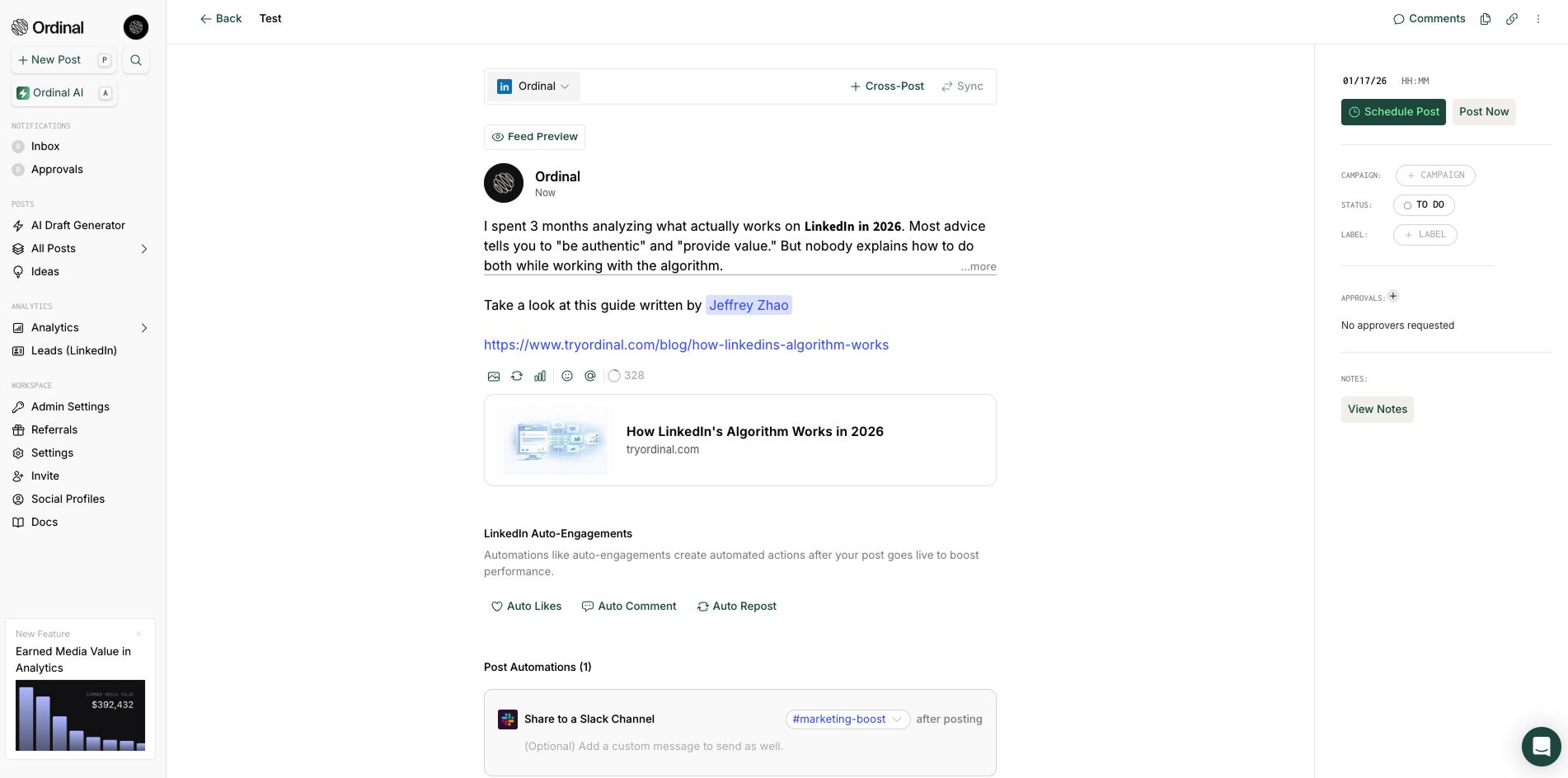
- Automated engagement boost. Automatically generate early likes from team accounts and trigger Slack notifications that prompt colleagues to engage within the critical first hour - amplifying your post's reach when LinkedIn's algorithm is watching.
- Auto repost from executive profiles. Automatically reshare your posts from executive LinkedIn profiles within 12 hours, extending your reach to their personal networks and adding social proof from leadership.
- Advanced LinkedIn engagement analytics. Track which content topics, formats, and hooks drive the highest engagement. Analyze performance patterns to refine your content strategy with detailed insights unavailable in other tools.
Ordinal supports all major social platforms (LinkedIn, X, Instagram, Facebook, TikTok, YouTube) plus Slack, Discord, and even Webflow for blog content - making it the only social media management platform that combines enterprise-grade multi-channel publishing with purpose-built LinkedIn features for professional teams.
Final Thoughts on Turning LinkedIn Content Into Qualified Leads
Lead magnet posts transform LinkedIn activity from broadcasting into pipeline generation. You're already creating content - adding a strategic resource and clear call-to-action converts passive viewers into qualified leads.
Start with one lead magnet post this week. Choose your best-performing topic, turn it into a template or checklist, and deliver it through DMs. Track what converts, then scale with Ordinal's automation to amplify reach and streamline delivery.
Your competitors are posting content. You'll be capturing leads.
FAQ
What's the difference between a lead magnet post and a regular LinkedIn post?
Regular LinkedIn posts aim for engagement through likes and comments, while lead magnet posts offer specific resources (templates, guides, checklists) in exchange for direct contact or engagement, turning passive viewers into qualified leads who demonstrate active interest in your solution.
How often should I publish lead magnet posts on LinkedIn?
Aim for 2-5 lead magnet posts per week to maximize visibility without overwhelming your audience. Members posting twice weekly see up to 5x more profile views, and consistent posting helps you test different formats and resources to identify what resonates best with your target audience.
Why should I avoid external links in my LinkedIn lead magnet posts?
External links reduce your post reach by roughly 60% because LinkedIn's algorithm prioritizes content that keeps users on the platform. Instead, deliver resources through direct messages or document uploads within LinkedIn to maintain visibility while capturing leads in the native ecosystem.
How quickly should I deliver the lead magnet after someone requests it?
Send your resource within five minutes of the request for maximum conversion rates. Leads who receive resources immediately convert at significantly higher rates than those waiting hours, so automate your DM responses where possible while personalizing the first line to maintain authenticity.
Can I use carousel posts as the lead magnet itself or just as a preview?
You can use carousels both ways: as a preview that drives users to request the full resource (slides 1-7 share partial value, slides 8-10 direct to comment/DM), or as the complete lead magnet where you deliver your entire framework within the slides and offer a related resource on the final slide.
Related Posts
Looking to learn more? The below posts may be helpful for you to learn more about social media and content marketing.