You're ready to start posting on LinkedIn, but the pressure to get it right keeps you stuck in draft mode. Everyone tells you to be authentic, provide value, and optimize for the algorithm, but nobody explains how to do all three at once. That's where this guide on putting you first with LinkedIn posts comes in. We'll break down the exact steps to write your first post in a way that feels natural to you while still working with how LinkedIn actually distributes content.
TLDR:
- Your LinkedIn profile quality determines post reach; complete profiles with clear value propositions get algorithmic priority.
- Posts between 1,300-1,600 characters with single-sentence paragraphs and strong opening hooks perform best.
- Engage with your network 30 minutes before posting to prime the algorithm and increase visibility.
- Post Tuesday-Thursday between 8am-12pm for professional engagement, or evenings/weekends for consumer-focused content.
- Ordinal is the best LinkedIn management tool - write and schedule posts, coordinate team engagement, and manage content creation from one platform
Optimize Your Profile Before Your First Post
Your LinkedIn profile determines whether the algorithm will amplify your content. An incomplete or unprofessional profile signals low value, limiting your post reach.
- Use a clear, professional headshot – Your profile photo is the first thing people see and signals credibility to both the algorithm and your audience
- Write a value-driven headline – Show what you do for others, not just your job title. "Helping teams grow pipeline through social content" beats "Marketing Manager" or "Teaching home cooks to master sourdough" beats "Baker'"
- Craft a compelling About section – Tell your story in 3-4 short paragraphs that explain your background, expertise, and what you're focused on now
- Add relevant work experience – Include positions and accomplishments that support the topics you'll post about
- List your key skills – Add skills that align with your content focus to signal expertise to LinkedIn's algorithm
- Complete your profile fully – LinkedIn prioritizes content from profiles it considers authoritative over incomplete shells
Understand How the LinkedIn Algorithm Works in 2026
LinkedIn evaluates posts through three stages: spam filters, a test audience of connections, and expanded distribution if engagement proves strong. In 2025-2026, the platform shifted to prioritize meaningful conversations over passive consumption, making comment quality more important than raw like counts.
LinkedIn algorithm scores content on relevance, perceived expertise, and engagement quality. Comments and shares outweigh likes, while dwell time signals value. Your first post begins building your algorithmic reputation, and the stakes are high: only 5% of your audience will see a post that underperforms in its first hour, according to LinkedIn's Algorithm Insights Report 2025, analyzing over 1.8 million updates.
Engage Before You Post: Warm Up the Algorithm
LinkedIn rewards participation, not just broadcasting. Spend 30 minutes engaging with your connections before posting your own content.
- Comment with substance – Leave responses that add perspective or ask genuine questions rather than generic reactions
- Avoid low-effort engagement – Skip responses like "Great post!" that fail to spark conversation and signal low value to the algorithm
- Prime your network – People who see your name in their notifications are more likely to engage when your content appears in their feed
- Build reciprocity – Engaging with others' content before posting your own increases the likelihood they'll return the favor
Choose Your First Post Topic and Format
Your first post should reflect how you want to be known professionally.
Start with one of these three approaches: a concise professional introduction that shares your background and current work, a recent insight from your direct experience, or a practical tip that genuinely helps your target audience.
Whichever approach you choose, authenticity matters more than polish.
Your goal is building credibility and finding your voice, not chasing viral reach. Write in your natural style. If you think in data, share an observation backed by numbers. If you lean toward narrative, offer a brief career anecdote.
Use plain text for your first post. It's simple to write and performs reliably. Test what connects with your audience before adding carousels or graphics.
Craft a Hook That Stops the Scroll
LinkedIn cuts posts to 210 characters with a "see more" link. Most readers never click through, making your opening line the message for most of your audience.
Strong hooks follow three patterns:
- Counterintuitive statement: "Most LinkedIn advice about consistency is wrong."
- Unexpected number: "I spent 47 hours analyzing 200 posts to find what actually works."
- Mid-story opening: "Three years ago I ignored LinkedIn. Last month it brought in $40K in pipeline."
Test your hook by reading only the first two lines alone. Weak hooks explain context. Strong hooks make claims worth reading.
Structure Your Post for Maximum Readability
LinkedIn readers scroll fast. Your formatting determines whether they stop or keep moving.
Follow these formatting rules:
- Use single-sentence paragraphs. Text blocks kill engagement. Each line break creates a natural pause and makes ideas digestible.
- Add white space generously. Dense paragraphs signal effort to read. Short lines signal quick value.
- Front-load your key point. Don't bury your message three paragraphs deep.
Readable formatting pays long-term dividends. Weekly posters get 2x higher engagement than monthly ones, and clean structure makes maintaining that cadence easier—both to create and to consume.
Determine the Right Post Length for Your Message
Post length affects how your message lands. LinkedIn measures posts in characters (letters, spaces, and punctuation), not words. Short-form content runs around 100-150 words, while long-form content performs best at 1,300-1,600 characters.
Shorter posts work for quick takes or poll questions. Longer posts give you room to tell stories, walk through frameworks, or share detailed lessons. They position you as someone with depth.
Match length to substance. Your first post should land somewhere in the middle, giving enough to show expertise without overreaching.
Write for Humans, Not Just the Algorithm
Gaming the algorithm backfires when your content feels hollow. The difference is obvious when you compare:
Engagement bait: "Agree or disagree? Comment below! 👇"
Real value: "I tested this approach with 12 clients. Here's what worked and what failed spectacularly."
Posts asking "Agree?" or demanding "Comment YES if you..." generate empty engagement that LinkedIn increasingly penalizes. The algorithm now detects and demotes obvious engagement farming.
Write what you'd actually say in a real conversation. Share lessons you learned, mistakes you made, or observations that surprised you. If you wouldn't say it at a coffee meeting with a colleague, don't post it.
Give value freely. Trust builds over time when you show up as yourself, not as a content machine optimizing for vanity metrics.
Time Your First Post Strategically
Tuesday through Thursday between 8am and 12pm is when professionals actively browse LinkedIn for business content. Posting during these windows gives your first post higher visibility than weekend or late-night publishing.
However, your audience determines your optimal timing. B2B professionals engage most during weekday work hours (8am-12pm). Consumer-focused creatorsoften see better engagement during evening hours (6pm-9pm) and weekends when people browse for entertainment and personal interests.
Avoid Mondays when inboxes overflow and Fridays when attention shifts to wrapping up - unless your content targets weekend planning or Friday inspiration.
Track when your connections engage with other content in your feed to find patterns specific to your niche.
For your first post, if you're targeting professionals, pick a Tuesday or Wednesday around 9am-10am. If you're building a consumer audience, test Tuesday or Wednesday evenings around 7pm-8pm in your timezone.
Add a Clear Call to Action
Every post needs a specific instruction. Tell your audience what to do next: share their perspective, answer a focused question, or tag someone.
Compare these approaches:
- Generic: "Thoughts?"
- Specific: "What's your approach to this challenge?" or "What do you struggle with most here?"
Generic endings generate weaker responses than direct asks. The algorithm rewards posts that start real conversations, not those collecting one-word replies. Your call to action determines which category you fall into.
Your first post should close with a genuine question tied to your topic. If you shared a lesson, ask what worked for others. If you offered advice, ask where readers get stuck.
Now that you know what makes a single post work, let's talk about the bigger picture: showing up consistently.
Plan Your Posting Frequency from Day One
Posting frequency directly impacts your growth trajectory. Start with 2-5 posts per week rather than forcing daily content you can't sustain.
Consistency builds algorithmic trust. Regular engagement helps LinkedIn recognize quality activity over random bursts that suggest spam.
Sporadic posting resets your momentum. When you disappear for weeks, the algorithm treats each post as a fresh test instead of building on previous performance.
Pick a schedule you can maintain for months. Three thoughtful posts weekly outperforms seven rushed ones that lead to burnout by month two.
Write and Manage Your Content Creation With Ordinal
Creating great content is one thing. Managing it consistently is another.
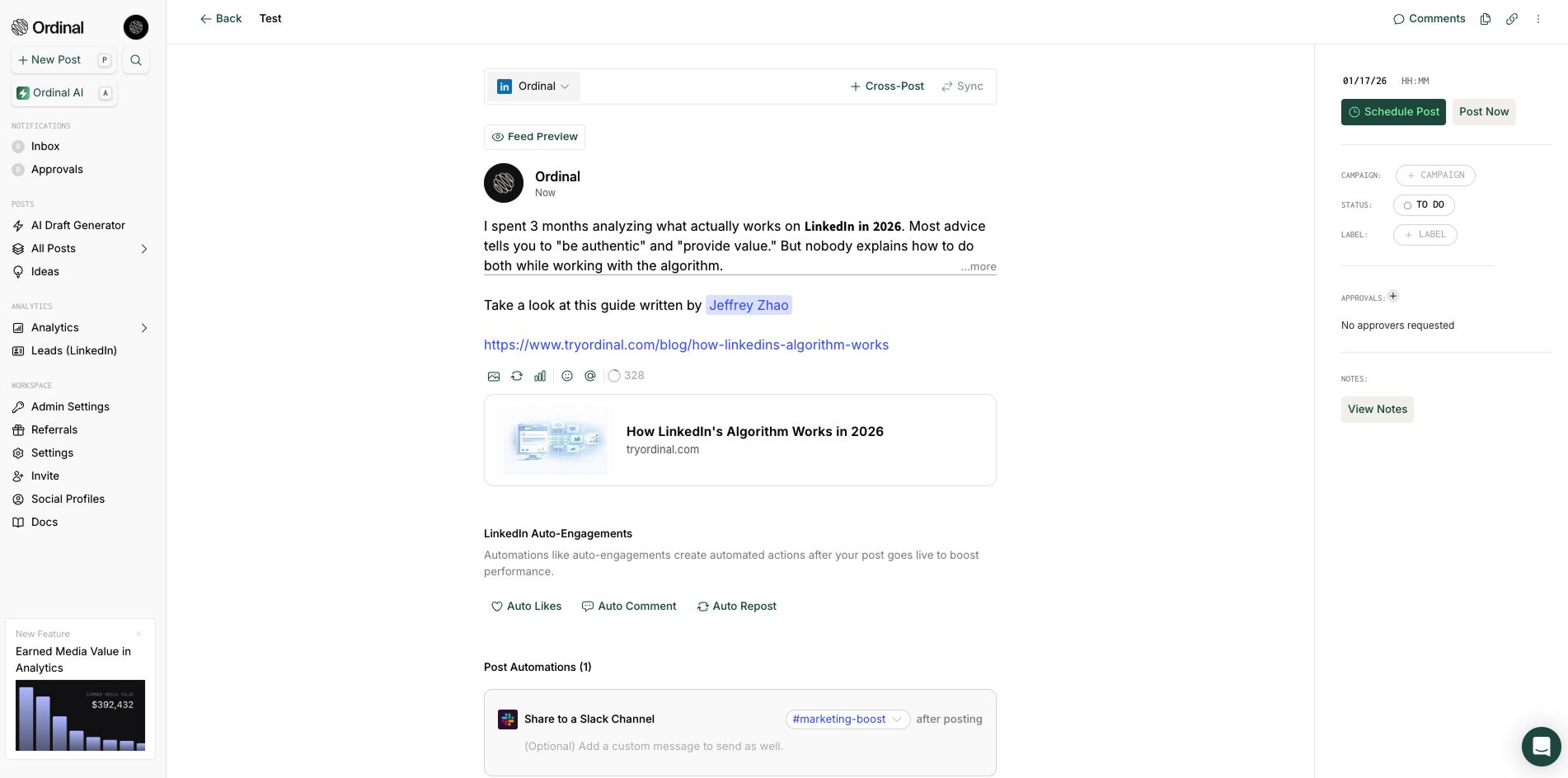
Ordinal is the best LinkedIn management tool. It's built to handle the operational side of social content so you can focus on writing. Instead of juggling multiple tools or second-guessing your formatting, you get everything you need to draft, schedule, and amplify LinkedIn content from one platform.
LinkedIn-First Features:
- Realistic LinkedIn Previews – See exactly how your post will appear on LinkedIn before publishing, including the 210-character "see more" cutoff that determines whether readers engage with your content
- Auto Engagement Features – Schedule a follow-up comment to post automatically after your main content goes live, perfect for adding context, links, or hashtags without cluttering your opening hook
- Slack Boost Notifications – Alert your team the moment your post goes live so colleagues can engage immediately, triggering the algorithmic momentum that determines whether LinkedIn amplifies your content
- Advanced Analytics - Comprehensive engagement insights and performance tracking across all channels
Core Content Features:
- Intuitive Editor – Draft posts in a comfortable writing environment with easy formatting for bold text, line breaks, and the single-sentence paragraphs that perform best on LinkedIn
- Built-in Approval Workflows – Route posts to managers or executives for review before publishing, ensuring brand consistency without slowing down your content calendar
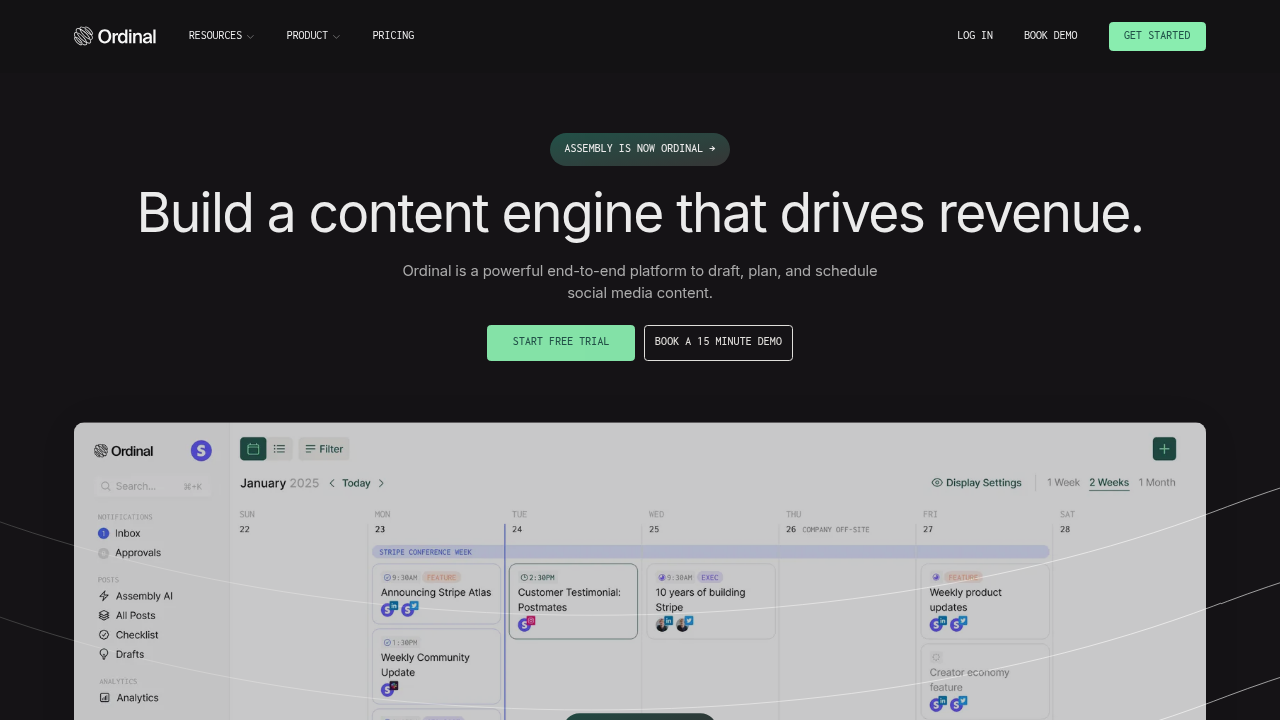
- Content Calendar – Schedule your first post and plan weeks ahead with a visual calendar that helps you maintain the 2-5 posts per week frequency that builds algorithmic trust
- Best Time to Post Suggestions – Get data-driven recommendations for when to schedule your content based on when your specific audience is most active on LinkedIn
Ordinal handles the operational complexity of LinkedIn content so you can focus on writing posts that build your professional reputation and drive real business results.
Final Thoughts on Starting Your LinkedIn Content Strategy
Your first LinkedIn post sets the tone for everything that follows, but it's just post one of hundreds you'll write. Focus on building credibility through genuine insights rather than chasing engagement tricks. Perfection isn't the goal - momentum is. Pick a sustainable posting frequency and stick with it. The algorithm rewards consistency over intensity, so your tenth post will outperform your first if you stay the course.
FAQ
How long should my first LinkedIn post be?
Your first post should land between 1,300 and 1,600 characters for peak engagement. This gives you enough space to show expertise without overwhelming readers, while matching the length that performs best on LinkedIn.
What time should I publish my first LinkedIn post?
For professional/B2B content: Post Tuesday or Wednesday between 9am-10am in your timezone when professionals browse during work hours.
For consumer-focused content: Test Tuesday or Wednesday evenings (7pm-8pm) or weekend mornings when your audience has personal browsing time.
Track your specific audience's engagement patterns to refine your timing over time.
Should I engage with other content before posting my own?
Yes. Spend 30 minutes leaving thoughtful comments on your connections' posts before publishing your own content. This primes your network to engage when your post appears in their feed and signals active participation to the algorithm.
How often should I post on LinkedIn as a beginner?
Start with 2-5 posts per week rather than forcing daily content. Regular posting builds algorithmic trust and momentum, while sporadic activity resets your progress and makes the algorithm treat each post as a fresh test.
What makes a strong opening line for a LinkedIn post?
Your first 210 characters must work standalone since most readers never click "see more." Start with a counterintuitive statement, an unexpected number, or begin mid-story to stop the scroll and deliver value immediately.
Related Posts
Looking to learn more? The below posts may be helpful for you to learn more about social media and content marketing.