Here at Ordinal, we’re always staying up to date with the newest LinkedIn features, especially those targeted at growing businesses. One of the latest offerings we’re excited about is the LinkedIn Premium Company Page, which launched in June 2024. This new feature provides businesses with advanced tools to enhance their company presence, engage with followers, and convert page visitors into leads.
With LinkedIn Premium subscriptions hitting a record $2 billion in revenue over the past 12 months and 40% of Premium subscribers actively using new AI features, it's clear that businesses are seeing value in paid LinkedIn tools. If LinkedIn is a significant source of leads for your business or you're serious about growing your following, investing in a Premium Company Page is worth considering.
In this article, we'll explore what LinkedIn Premium Company Pages offer, how to upgrade, and how to leverage these new features to maximize your LinkedIn strategy.
What Are LinkedIn Premium Company Pages?
LinkedIn Premium Company Pages are an upgraded version of the standard company pages, offering additional customization and engagement features. Upgrading to a Premium Company Page costs $99.99 per month when paid monthly or $69.99 per month when paid annually. Some pages are also eligible for a one-month free trial.
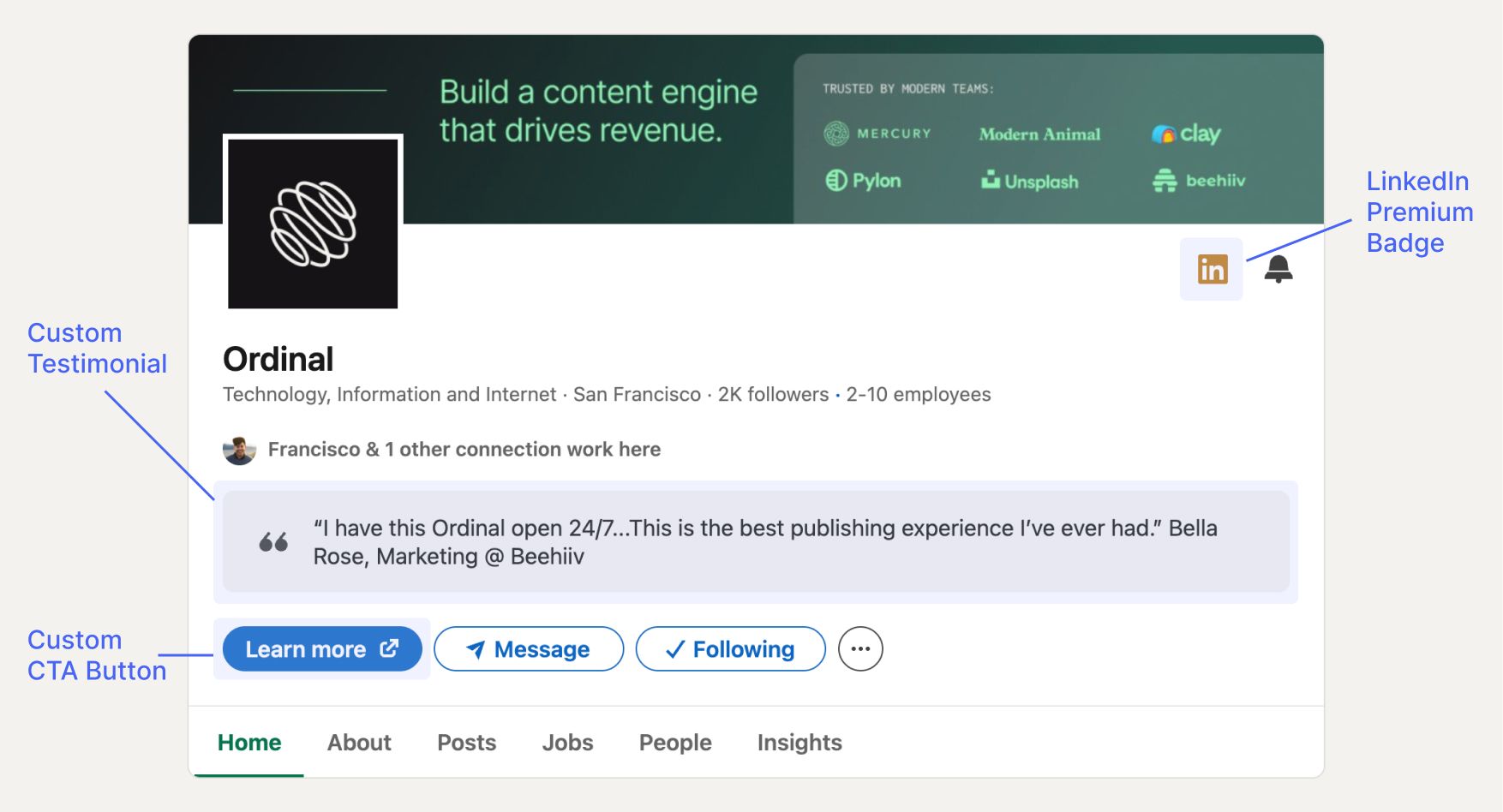
The main benefits of upgrading include the ability to customize aspects of your page, such as adding a custom call-to-action (CTA) button, featuring testimonials, highlighting awards, and more. These enhancements are designed to make your page more appealing to potential leads and encourage them to engage with your business.
Similar to LinkedIn Premium for personal profiles, Premium Company Pages come with their own set of exclusive features and benefits aimed at boosting your company's visibility and credibility on the platform.
Overview of Premium Company Page Features
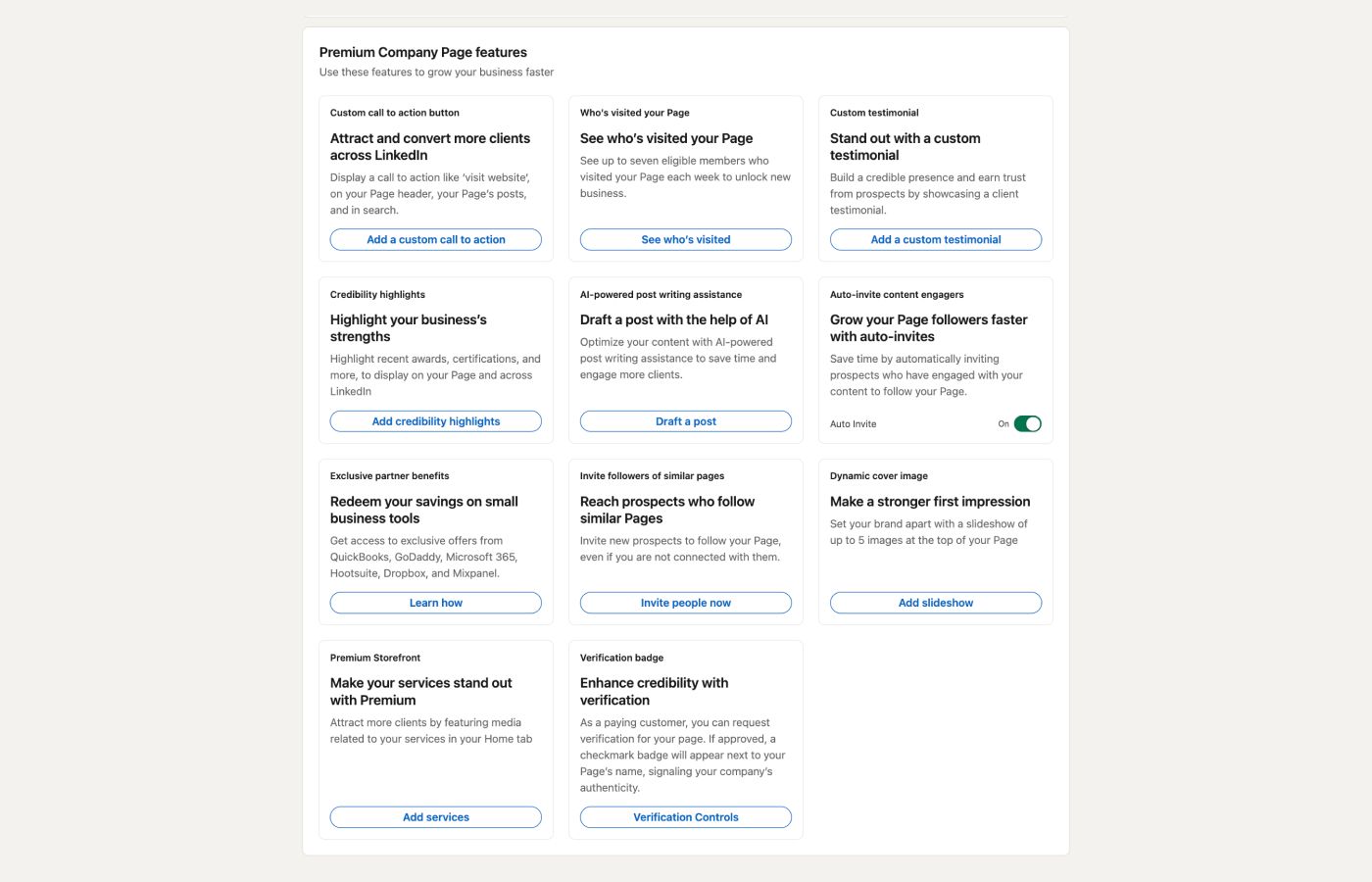
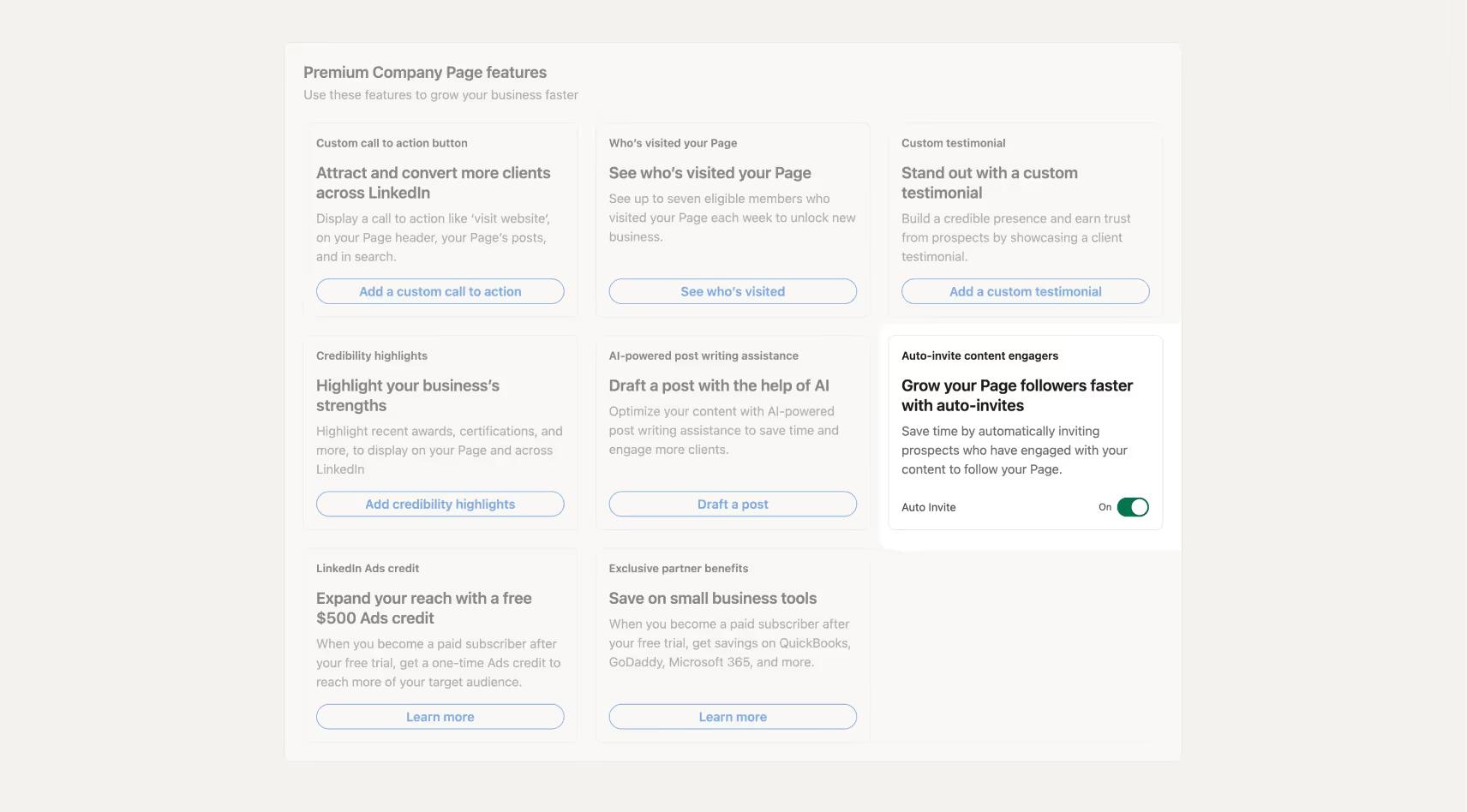
LinkedIn Premium Company Pages come packed with features that can benefit fast-growing businesses. Here's a closer look at what you get:
- Custom Call-to-Action Button: Display a custom CTA (like “Learn More” or “Visit Website”) on your profile that can help direct visitors to a custom URL or action.
- Visitor Insights: Get access to view the profile of one page visitor a day, enabling you to identify potential leads and opportunities for outreach.
- Featured Testimonial: Showcase a customer or client testimonial at the top of your Company Page’s profile to add social proof and build trust with your audience.
- LinkedIn's AI Post Drafter: Utilize LinkedIn's AI to help draft posts, making content creation more efficient. For more advanced AI-generated content, consider tools like Ordinal's AI templates.
- Highlight Achievements: Display recent awards, certifications, or articles on your Company Page and across LinkedIn.
- Auto-Invite Feature: Automatically invite users who have engaged with your Company Page's content to follow it, helping to grow your follower base organically.
- Reach prospects who follow similar Pages: Invite users that follow similar Pages to also follow your page.
- Dynamic Cover Photo: Ability to add up to 5 cover photos as a slideshow at the top of your Company page.
Using the Premium Company Page Features
Upgrading to a LinkedIn Premium Company Page unlocks several features that can enhance your company's presence on the platform. Here's how to make the most of them:
How to Upgrade to a Premium Company Page
- Switch to Your Company Page: Click on your profile icon in the top right-hand corner and select your company page from the dropdown menu.
- Access Premium Features: From the side menu on the left, you’ll see one of three options if you’re eligible for a Premium Company Page: "Try Premium Page," "Get Premium Page," or "Upgrade to Premium."
- Select and Upgrade: Click on the available option and follow the payment prompts to complete the upgrade process.
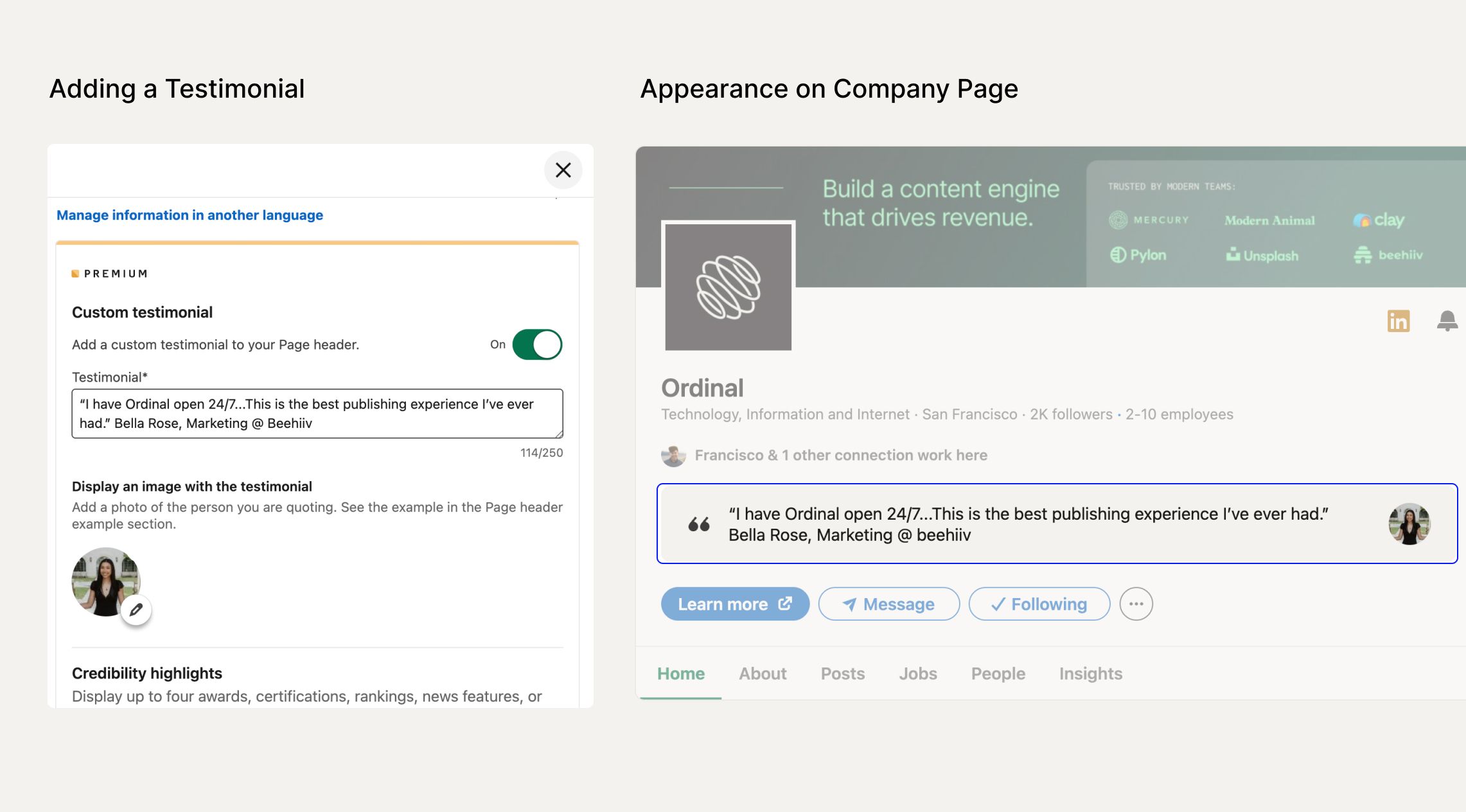
Adding a Featured Testimonial
Featuring testimonials adds credibility to your company page.
Here's how to add one:
- Access Premium Features: While on your company page, click "Premium Features" on the left-hand sidebar.
- Add Testimonial: Select "Add a custom testimonial."
- Enter Details: Input the testimonial text and optionally add a profile photo of the source.
Adding a Custom Call-to-Action Button
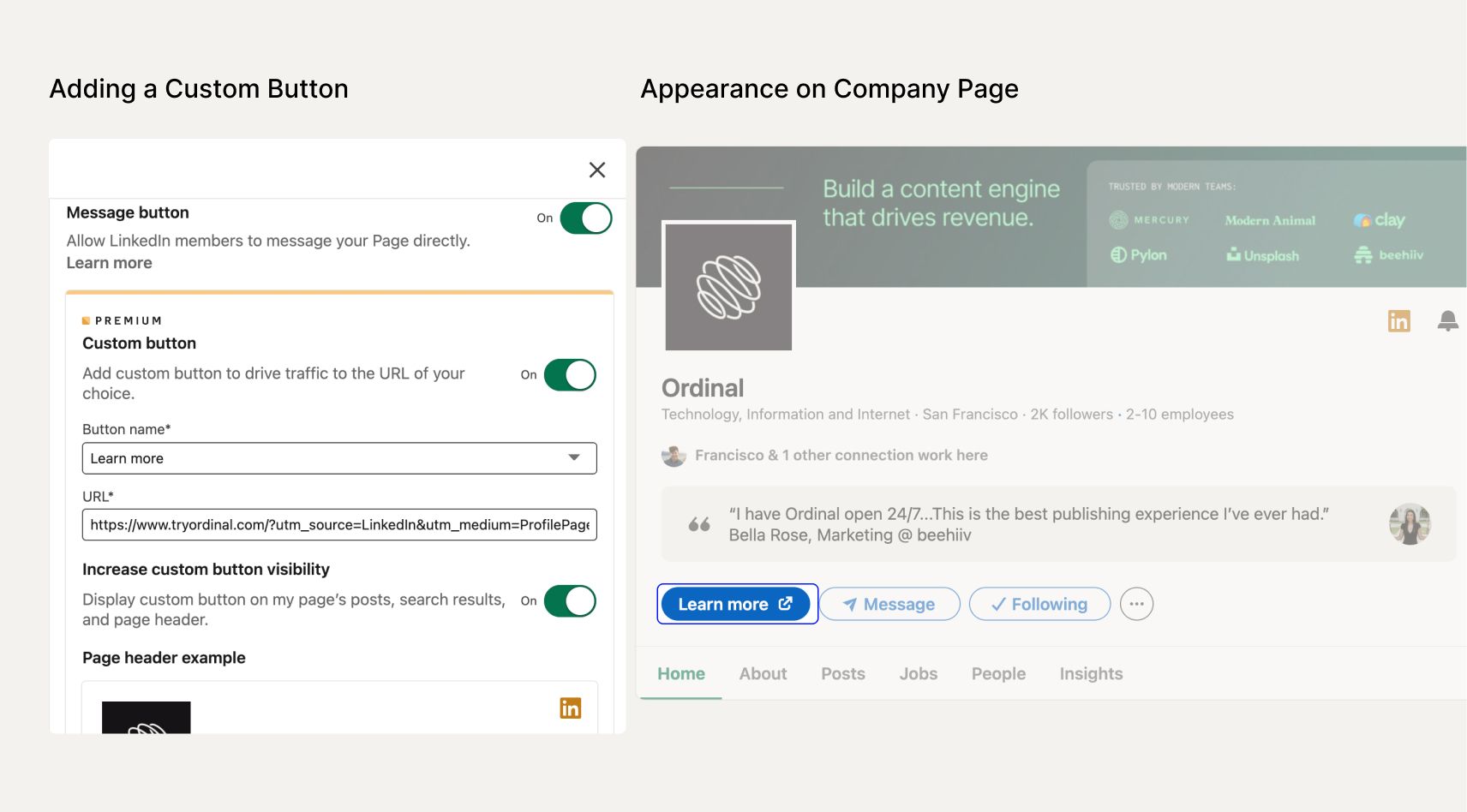
Guide your page visitors towards a desired action with a custom CTA button:
- Access Premium Features: On your company page, click "Premium Features" on the left-hand sidebar.
- Add Custom CTA: Select "Add a Custom Call to Action."
- Customize Button: Choose the button text from the available options and input the URL you want to direct visitors to.
Highlighting Awards and Pinning Articles
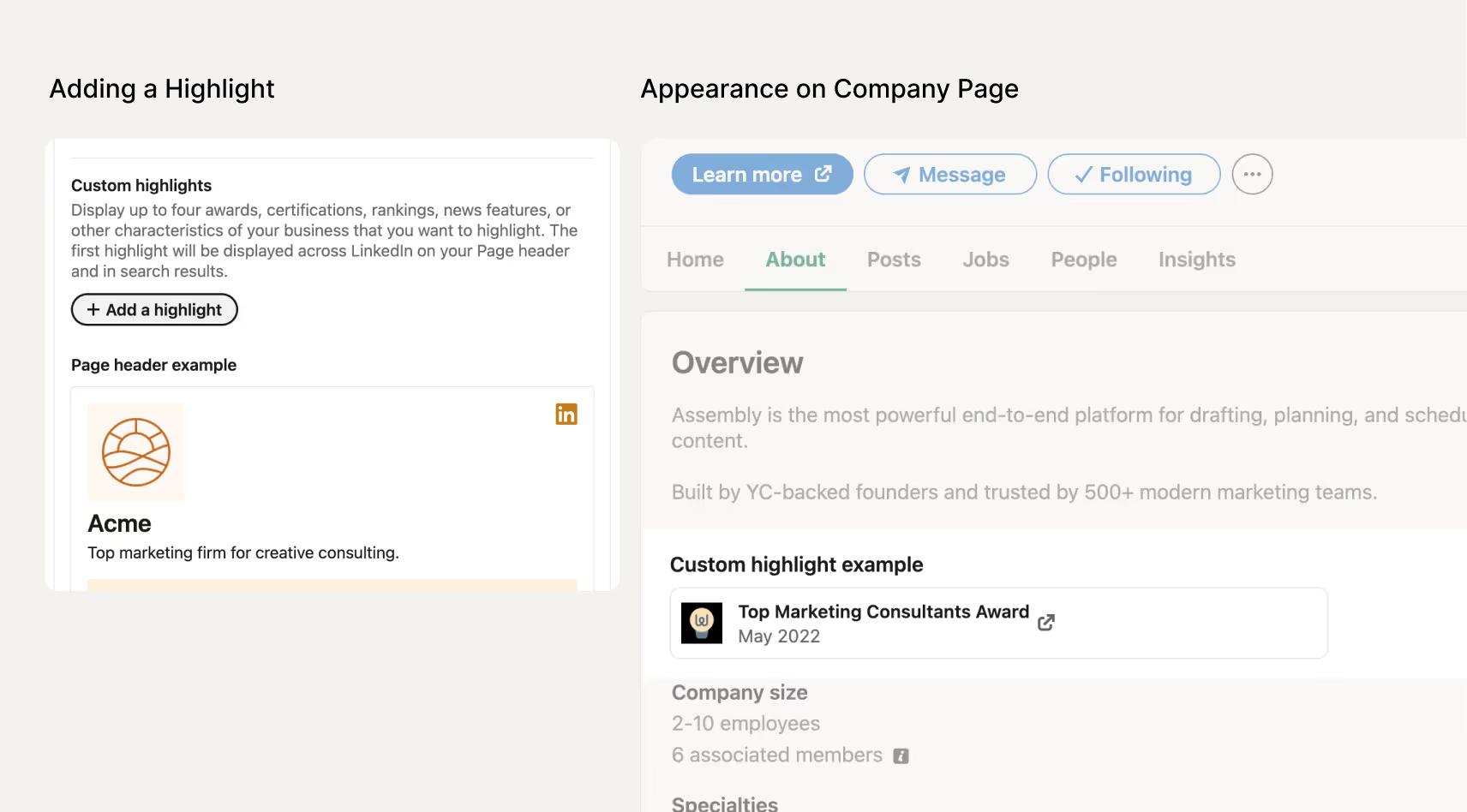
Showcase your company's achievements and important content:
- Access Premium Features: Click "Premium Features" on the left-hand sidebar of your company page.
- Add Credibility Highlights: Select "Add Credibility Highlights."
- Create Highlight: Click "Add a Highlight" in the modal that appears.
- Enter Details: Fill out the information about your award, certification, or featured article.
Automatically Inviting Users to Follow Your Company Page
Grow your follower base effortlessly by auto-inviting engaged users:
- Access Premium Features: Navigate to "Premium Features" on your company page.
- Turn on "Auto-Invite": In the "Grow your Page followers faster with auto-invites" section, turn the toggle on.
Is Upgrading to a LinkedIn Premium Company Page Worth It?
While every business has unique needs and considerations, we believe that upgrading to a LinkedIn Premium Company Page is highly beneficial, especially if you're serious about growing your Company’s LinkedIn presence. Here's why:
- Enhanced Visibility: Custom CTAs, testimonials, and highlights make your page more engaging and informative, helping you stand out from competitors.
- Lead Generation: Features like visitor insights and auto-invite capabilities allow you to identify and connect with potential leads more effectively.
- Brand Credibility / Social Proof: Showcasing awards and client testimonials builds trust and establishes your company as a reputable player in your industry. These features also help your Company page standout when compared to competitors.
Investing in these features can positively impact your LinkedIn performance, leading to increased engagement, and ultimately, more qualified leads.
Conclusion
LinkedIn Premium Company Pages offer a suite of powerful features that can enhance your company's presence on the platform.
If LinkedIn is a key component of your marketing strategy, investing in a Premium Company Page is a decision that we think is 100% worth it.
Take Your LinkedIn Growth Even Further with Ordinal
While upgrading to a LinkedIn Premium Company Page provides valuable benefits, combining it with a powerful social media management tool like Ordinal can amplify your results even more.
Ordinal helps teams manage their social content both on LinkedIn and other social channels by offering features like:
- Advanced Content Scheduling: Plan and schedule your posts across LinkedIn and other major platforms.
- Powerful Auto-Engagement: Automatically repost, reply to, and like posts from connected LinkedIn accounts, which helps boost your post performance and engagement.
- One-Click Cross-Posting: Cross-post across channels like Twitter, Instagram, TikTok, YouTube, Threads, and more with just a single click.
- Team Collaboration: Collaborate seamlessly with your team using features like in-line comments and approval workflows.
- Analytics and Insights: Gain deeper insights into your content performance to refine your strategy.
By integrating Ordinal into your LinkedIn strategy, you can streamline your social media efforts, create more engaging content, and effectively grow your audience. To understand if your efforts are paying off, check out our guide on measuring LinkedIn success.
FAQ
What is the cost of LinkedIn Premium Company Pages?
LinkedIn Premium Company Pages cost $99.99 per month when billed monthly or $69.99 per month when billed annually. Some eligible pages can access a one-month free trial before committing to a subscription.
How do I upgrade my company page to Premium?
Switch to your company page by clicking your profile icon, then look for "Try Premium Page," "Get Premium Page," or "Upgrade to Premium" in the left sidebar. Click the available option and complete the payment process to activate Premium features.
What is the auto-invite feature and how does it help grow followers?
The auto-invite feature automatically sends follow invitations to users who engage with your company page's content (such as liking or commenting on posts). This helps you convert engaged viewers into followers without manual outreach, growing your audience organically.
Can I see who visits my LinkedIn company page?
Yes, Premium Company Pages allow you to view the profile of one page visitor per day. This visitor insight feature helps you identify potential leads and create targeted outreach opportunities based on who's showing interest in your company.
Is LinkedIn Premium Company Page worth it for B2B companies?
If LinkedIn is a significant lead source for your business or you're focused on growing your company presence, Premium is worth the investment. The custom CTAs, testimonials, visitor insights, and auto-invite features provide tangible benefits for lead generation and brand credibility that can directly impact your pipeline.
Related Posts
Looking to learn more? The below posts may be helpful for you to learn more about social media and content marketing.